> ## Documentation Index
> Fetch the complete documentation index at: https://docs.pipecat.ai/llms.txt
> Use this file to discover all available pages before exploring further.
# Pipecat
> Open source Python framework for building voice and multimodal AI agents.
Pipecat is an open source Python framework for building voice and multimodal AI agents. It orchestrates AI services, network transports, and audio processing to enable ultra-low latency conversations that feel natural and responsive.
Want to dive right in? Build and run your first Pipecat application
## What You Can Build
Natural, real-time conversations with AI using speech recognition and
synthesis
Connect to your agent via phone for support, intake, and customer service
interactions
Applications that combine voice, video, images, and text for rich interactions
Storytelling experiences and social companions that engage users
Voice-controlled games and interactive experiences with real-time AI responses
Build structured conversations with Pipecat Flows to complete tasks and improve LLM accuracy
## How It Works
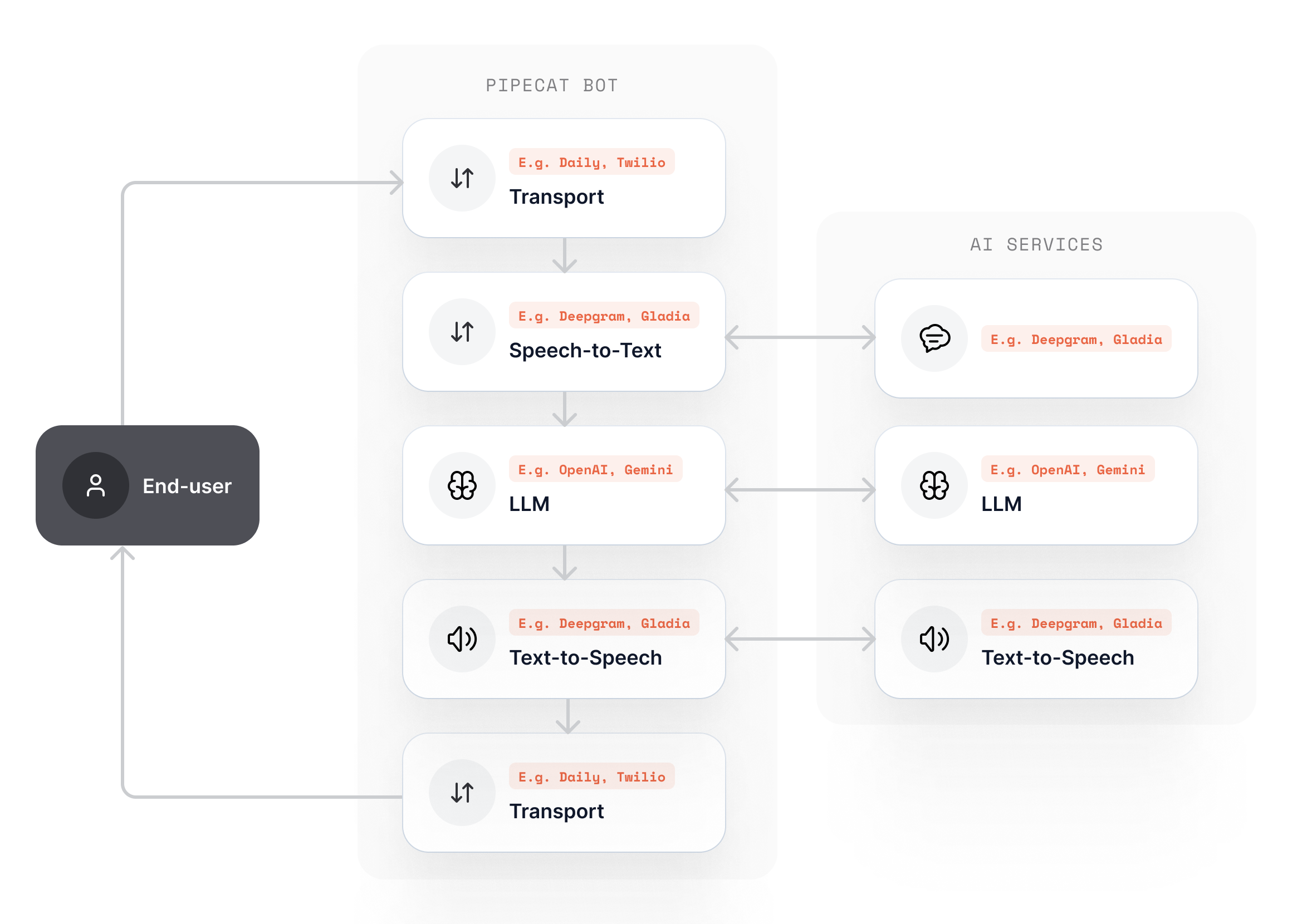
Pipecat orchestrates AI services in a **pipeline**, which is a series of processors that handle real-time audio, text, and video frames with ultra-low latency.
Here's what happens in a typical voice conversation:
1. **Transport** receives audio from the user (browser, phone, etc.)
2. **Speech Recognition** converts speech to text in real-time
3. **LLM** generates intelligent responses based on context
4. **Speech Synthesis** converts responses back to natural speech
5. **Transport** streams audio back to the user
In most cases, the entire round-trip interaction happens between 500-800ms, creating a natural conversation experience for the user.
 ## A Multi-Agent System
A typical bot is a single agent, but Pipecat is a multi-agent system: you can coordinate many agents that talk to each other over a shared message **bus**. The same `WorkerRunner` you use for one bot coordinates many agents, so any Pipecat app is multi-agent ready.
* The **`WorkerRunner`** owns the bus and manages every agent's lifecycle and discovery.
* Each agent is a **worker**. `BaseWorker` is the foundation and coordinates purely over the bus with no pipeline of its own; `PipelineWorker` and `LLMWorker` add a Pipecat pipeline.
* Any agent can **start other agents** at runtime: a worker adds child workers (or the runner does), and they immediately join the shared bus.
* Agents coordinate in more than one way. **Handoff** transfers control of the conversation to another agent, while **jobs** and **job groups** dispatch work to one or many agents in parallel and collect their results.
Agents can run together in one process over an in-process bus, or across separate processes and machines over a Redis or Postgres bus, without changing your agent code.
Learn how agents, the runner, and the bus work together
## Ready to Build?
Build and run your first Pipecat application
Learn about pipelines, processors, transports, and context management
Browse the complete list of 100+ AI service integrations
Deploy to Pipecat Cloud or self-host on your own infrastructure
## A Multi-Agent System
A typical bot is a single agent, but Pipecat is a multi-agent system: you can coordinate many agents that talk to each other over a shared message **bus**. The same `WorkerRunner` you use for one bot coordinates many agents, so any Pipecat app is multi-agent ready.
* The **`WorkerRunner`** owns the bus and manages every agent's lifecycle and discovery.
* Each agent is a **worker**. `BaseWorker` is the foundation and coordinates purely over the bus with no pipeline of its own; `PipelineWorker` and `LLMWorker` add a Pipecat pipeline.
* Any agent can **start other agents** at runtime: a worker adds child workers (or the runner does), and they immediately join the shared bus.
* Agents coordinate in more than one way. **Handoff** transfers control of the conversation to another agent, while **jobs** and **job groups** dispatch work to one or many agents in parallel and collect their results.
Agents can run together in one process over an in-process bus, or across separate processes and machines over a Redis or Postgres bus, without changing your agent code.
Learn how agents, the runner, and the bus work together
## Ready to Build?
Build and run your first Pipecat application
Learn about pipelines, processors, transports, and context management
Browse the complete list of 100+ AI service integrations
Deploy to Pipecat Cloud or self-host on your own infrastructure