> ## Documentation Index
> Fetch the complete documentation index at: https://docs.pipecat.ai/llms.txt
> Use this file to discover all available pages before exploring further.
# Agent Images
> How to containerize your agent project
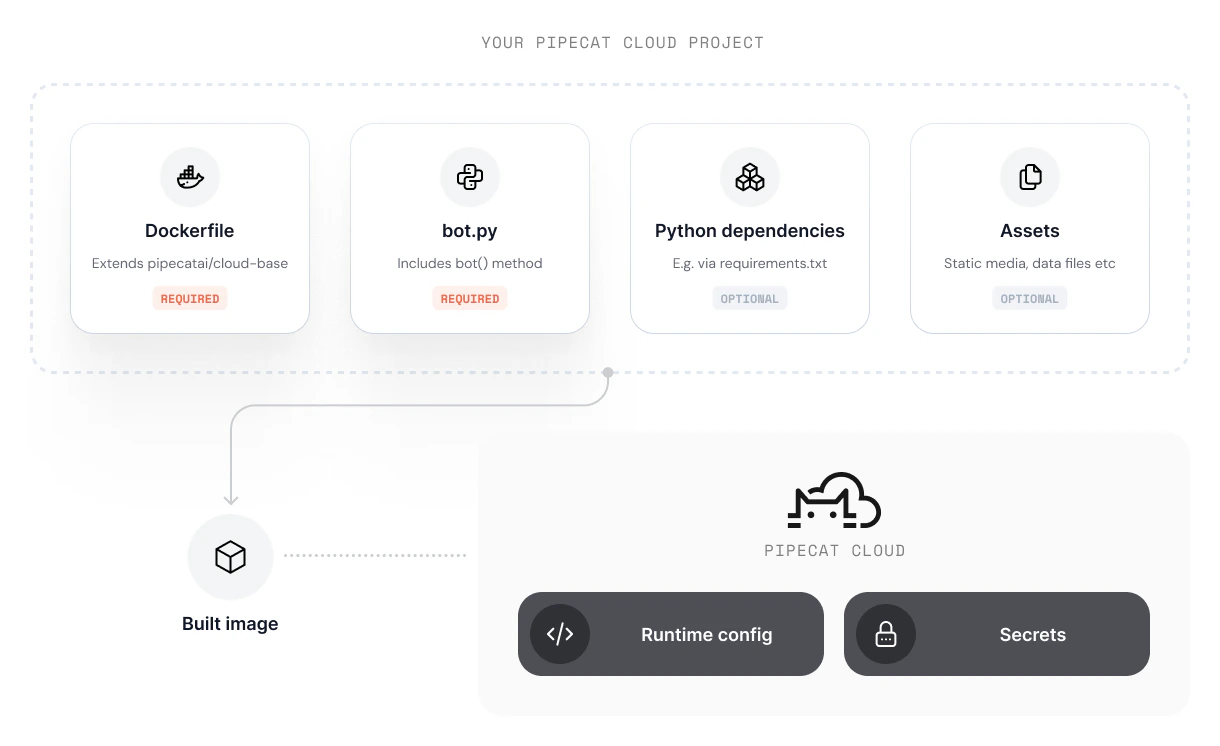
Pipecat Cloud agents are designed to be run from containerized images. This allows you to run the agent in a controlled environment, with all the dependencies and configurations needed.
Your project defines the environment that your agent will run using Docker and built using a Dockerfile in the root directory of the project.
For example, your Dockerfile might look like this:
```dockerfile theme={null}
FROM dailyco/pipecat-base:latest
# Enable bytecode compilation
ENV UV_COMPILE_BYTECODE=1
# Copy from the cache instead of linking since it's a mounted volume
ENV UV_LINK_MODE=copy
# Uncomment this if you wish to print a summary of the features available in the base image.
# ENV PCC_LOG_FEATURES_SUMMARY=true
# Install the project's dependencies using the lockfile and settings
RUN --mount=type=cache,target=/root/.cache/uv \
--mount=type=bind,source=uv.lock,target=uv.lock \
--mount=type=bind,source=pyproject.toml,target=pyproject.toml \
uv sync --locked --no-install-project --no-dev
# Copy the application code
COPY ./bot.py bot.py
```
```dockerfile theme={null}
FROM dailyco/pipecat-base:latest
COPY ./requirements.txt requirements.txt
# Uncomment this if you wish to print a summary of the features available in the base image.
# ENV PCC_LOG_FEATURES_SUMMARY=true
RUN pip install --no-cache-dir --upgrade -r requirements.txt
COPY ./bot.py bot.py
```
 ## Using an official base image
Pipecat Cloud provides a series of base images that we recommend for most use-cases. Base images provide:
* Simplified development and deployment
* Optimizations for performance and security
* Pre-installed system dependencies for most multi-modal agent use-cases
Using a base image reduces complexity in your project but requires you to adhere to a specific project structure.
* Your project must contain a `bot.py` file that defines the agent pipeline
* The `bot.py` must contain a `bot()` method that is the entry point for your agent pipeline
* The `bot()` method must be asynchronous, e.g. `async def bot():`
You do not need to specify a `CMD` as part of your Dockerfile - the base image is configured to run your `bot.py` module.
You can browse available base images in the [Pipecat Cloud Docker Hub ](https://hub.docker.com/u/dailyco).
### Reserved paths
The base image uses the `/app` directory for its internal operation. **Avoid copying files to `/app`** in your Dockerfile to prevent conflicts with system files.
Writing to `/app` may overwrite critical system files and cause your
deployment to fail. Your agent code should be placed in `bot.py` (required)
and any additional modules, which the base image handles automatically.
### Reserved HTTP routes
The base image exposes the following HTTP routes for Pipecat Cloud platform integration:
| Route | Method | Description |
| ------------ | --------- | ----------------------------------------------------------------------------- |
| `/bot` | POST | Main entry point called by Pipecat Cloud to start agent sessions |
| `/ws` | WebSocket | WebSocket endpoint for real-time communication (e.g., telephony integrations) |
| `/api/offer` | POST | SmallWebRTC offer handling for peer-to-peer connections |
| `/api/offer` | PATCH | SmallWebRTC ICE candidate handling |
| `/whatsapp` | POST | WhatsApp Business webhook endpoint |
These routes are automatically configured based on available features. For
example, the `/whatsapp` route is only available when WhatsApp environment
variables are configured.
### Reserved environment variables
The base image uses the following environment variables for configuration:
| Variable | Description |
| -------------------------- | --------------------------------------------------------------------------- |
| `PORT` | HTTP server port (default: `8080`) |
| `SHUTDOWN_TIMEOUT` | Server shutdown timeout in seconds (default: `7200`) |
| `PIPECAT_LOG_LEVEL` | Pipecat logging level: `TRACE`, `DEBUG`, `INFO`, `WARNING`, `ERROR`, `NONE` |
| `PCC_LOG_FEATURES_SUMMARY` | Set to `true` to log available features on startup |
| `IMAGE_VERSION` | Set automatically during build to track image versions |
| `ESP32_ENABLED` | Enable ESP32 mode for SmallWebRTC |
| `ESP32_HOST` | ESP32 host address |
| `ICE_CONFIG_URL` | ICE server configuration endpoint |
For WhatsApp integration, the following environment variables are required:
| Variable | Description |
| -------------------------- | -------------------------------------------- |
| `WHATSAPP_TOKEN` | WhatsApp API access token |
| `WHATSAPP_PHONE_NUMBER_ID` | WhatsApp Business phone number ID |
| `WHATSAPP_APP_SECRET` | WhatsApp app secret for webhook verification |
### Logging available features
To see which features are available in the base image at startup, set `PCC_LOG_FEATURES_SUMMARY=true`. This outputs a summary like:
```
2025-10-22 22:04:41.411 | INFO | feature_manager:log_features_summary:287 - ============================================================
2025-10-22 22:04:41.411 | INFO | feature_manager:log_features_summary:288 - Features available in this base image:
2025-10-22 22:04:41.412 | INFO | feature_manager:log_features_summary:289 - ============================================================
2025-10-22 22:04:41.412 | INFO | feature_manager:log_features_summary:299 - ✅ Daily Transport: ENABLED
2025-10-22 22:04:41.412 | INFO | feature_manager:log_features_summary:299 - ✅ Websocket Transport: ENABLED
2025-10-22 22:04:41.412 | INFO | feature_manager:log_features_summary:299 - ✅ SmallWebRTC Session Arguments: ENABLED
2025-10-22 22:04:41.412 | INFO | feature_manager:log_features_summary:299 - ✅ SmallWebRTC Transport: ENABLED
2025-10-22 22:04:41.412 | INFO | feature_manager:log_features_summary:299 - ✅ SmallWebRTC ICE Candidates: ENABLED
2025-10-22 22:04:41.412 | INFO | feature_manager:log_features_summary:299 - ✅ WhatsApp Integration: ENABLED
2025-10-22 22:04:41.412 | INFO | feature_manager:log_features_summary:314 - ============================================================
```
### Available base images
| Name | Description |
| ---------------------- | --------------------------------------------------------- |
| `dailyco/pipecat-base` | Multi-modal Pipecat optimized, suitable for most use-case |
The base image supports multiple Python versions. The default Python version is 3.12.
Python 3.10 base images are deprecated and will be removed in a future
release. Upgrade to Python 3.11 or later.
**Latest tags:**
* `dailyco/pipecat-base:latest` (Python 3.12, default)
* `dailyco/pipecat-base:latest-py3.10` (Python 3.10, deprecated)
* `dailyco/pipecat-base:latest-py3.11` (Python 3.11)
* `dailyco/pipecat-base:latest-py3.12` (Python 3.12)
* `dailyco/pipecat-base:latest-py3.13` (Python 3.13)
* `dailyco/pipecat-base:latest-py3.14` (Python 3.14)
**Versioned tags:**
* `dailyco/pipecat-base:0.1.0` (Python 3.12, default)
* `dailyco/pipecat-base:0.1.0-py3.10` (Python 3.10, deprecated)
* `dailyco/pipecat-base:0.1.0-py3.11` (Python 3.11)
* `dailyco/pipecat-base:0.1.0-py3.12` (Python 3.12)
* `dailyco/pipecat-base:0.1.0-py3.13` (Python 3.13)
* `dailyco/pipecat-base:0.1.0-py3.14` (Python 3.14)
For production use, we recommend pinning to specific versions.
## Using a custom image
For more complex use-cases, you can use a custom image.
When doing so, we recommend following best practices to ensure your agent instance runs optimally on the platform.
Our [base image](https://github.com/daily-co/pipecat-cloud-images/tree/main/pipecat-base) is open source and serves as a useful blueprint for configuring your custom agent image.
### Agent image structure
Custom agent images are for advanced use cases. For most teams,
we recommend using our base images. If needed, consult the base
image code as a reference.
For unsupported use cases, contact us at [help@daily.co](mailto:help@daily.co) or via
[Discord](https://discord.gg/dailyco).
Pipecat Cloud agent images must adhere to a specific structure to run on the platform. Our base images abstract away much of this complexity, but if you are building a custom image, you must ensure your agent adheres to the following:
* HTTP API that can handle requests from the platform to configure and run agent instances.
* The necessary system level dependencies (such as Python.)
In order to start an instance of your custom agent, you must expose a HTTP `POST /bot` route that will be called by the platform.
We recommend using FastAPI to create this route. Please refer to the base image code for an example of how to do this.
## Building the image
If you're using [cloud builds](/pipecat-cloud/guides/cloud-builds), you only
need a Dockerfile in your project — the CLI builds and deploys your image
automatically. The section below applies if you're building and pushing images
to your own container registry.
Pipecat Cloud requires all images to be built to target Linux on ARM. This is the most common platform for cloud deployments.
```bash theme={null}
docker build --platform linux/arm64 -t my-agent:latest .
```
Your agent image should include:
* All dependencies required for your agent to run.
* Assets (such as images or models) available in the container filesystem
* The entry point for your agent (usually a Python script)
* Additional system dependencies (if required)
### Best practices
* Keep your image as small as possible. Use multi-stage builds to reduce the size of the final image.
* Use a `.dockerignore` file to exclude unnecessary files from the image.
* Pipecat Cloud will automatically restart your agent if it crashes. Ensure your agent can handle this gracefully.
* Use [Secrets](./secrets) to securely store sensitive information in your agent image.
* To optimize for fast start-ups, avoid long running or blocking processes during initialization.
## Using an official base image
Pipecat Cloud provides a series of base images that we recommend for most use-cases. Base images provide:
* Simplified development and deployment
* Optimizations for performance and security
* Pre-installed system dependencies for most multi-modal agent use-cases
Using a base image reduces complexity in your project but requires you to adhere to a specific project structure.
* Your project must contain a `bot.py` file that defines the agent pipeline
* The `bot.py` must contain a `bot()` method that is the entry point for your agent pipeline
* The `bot()` method must be asynchronous, e.g. `async def bot():`
You do not need to specify a `CMD` as part of your Dockerfile - the base image is configured to run your `bot.py` module.
You can browse available base images in the [Pipecat Cloud Docker Hub ](https://hub.docker.com/u/dailyco).
### Reserved paths
The base image uses the `/app` directory for its internal operation. **Avoid copying files to `/app`** in your Dockerfile to prevent conflicts with system files.
Writing to `/app` may overwrite critical system files and cause your
deployment to fail. Your agent code should be placed in `bot.py` (required)
and any additional modules, which the base image handles automatically.
### Reserved HTTP routes
The base image exposes the following HTTP routes for Pipecat Cloud platform integration:
| Route | Method | Description |
| ------------ | --------- | ----------------------------------------------------------------------------- |
| `/bot` | POST | Main entry point called by Pipecat Cloud to start agent sessions |
| `/ws` | WebSocket | WebSocket endpoint for real-time communication (e.g., telephony integrations) |
| `/api/offer` | POST | SmallWebRTC offer handling for peer-to-peer connections |
| `/api/offer` | PATCH | SmallWebRTC ICE candidate handling |
| `/whatsapp` | POST | WhatsApp Business webhook endpoint |
These routes are automatically configured based on available features. For
example, the `/whatsapp` route is only available when WhatsApp environment
variables are configured.
### Reserved environment variables
The base image uses the following environment variables for configuration:
| Variable | Description |
| -------------------------- | --------------------------------------------------------------------------- |
| `PORT` | HTTP server port (default: `8080`) |
| `SHUTDOWN_TIMEOUT` | Server shutdown timeout in seconds (default: `7200`) |
| `PIPECAT_LOG_LEVEL` | Pipecat logging level: `TRACE`, `DEBUG`, `INFO`, `WARNING`, `ERROR`, `NONE` |
| `PCC_LOG_FEATURES_SUMMARY` | Set to `true` to log available features on startup |
| `IMAGE_VERSION` | Set automatically during build to track image versions |
| `ESP32_ENABLED` | Enable ESP32 mode for SmallWebRTC |
| `ESP32_HOST` | ESP32 host address |
| `ICE_CONFIG_URL` | ICE server configuration endpoint |
For WhatsApp integration, the following environment variables are required:
| Variable | Description |
| -------------------------- | -------------------------------------------- |
| `WHATSAPP_TOKEN` | WhatsApp API access token |
| `WHATSAPP_PHONE_NUMBER_ID` | WhatsApp Business phone number ID |
| `WHATSAPP_APP_SECRET` | WhatsApp app secret for webhook verification |
### Logging available features
To see which features are available in the base image at startup, set `PCC_LOG_FEATURES_SUMMARY=true`. This outputs a summary like:
```
2025-10-22 22:04:41.411 | INFO | feature_manager:log_features_summary:287 - ============================================================
2025-10-22 22:04:41.411 | INFO | feature_manager:log_features_summary:288 - Features available in this base image:
2025-10-22 22:04:41.412 | INFO | feature_manager:log_features_summary:289 - ============================================================
2025-10-22 22:04:41.412 | INFO | feature_manager:log_features_summary:299 - ✅ Daily Transport: ENABLED
2025-10-22 22:04:41.412 | INFO | feature_manager:log_features_summary:299 - ✅ Websocket Transport: ENABLED
2025-10-22 22:04:41.412 | INFO | feature_manager:log_features_summary:299 - ✅ SmallWebRTC Session Arguments: ENABLED
2025-10-22 22:04:41.412 | INFO | feature_manager:log_features_summary:299 - ✅ SmallWebRTC Transport: ENABLED
2025-10-22 22:04:41.412 | INFO | feature_manager:log_features_summary:299 - ✅ SmallWebRTC ICE Candidates: ENABLED
2025-10-22 22:04:41.412 | INFO | feature_manager:log_features_summary:299 - ✅ WhatsApp Integration: ENABLED
2025-10-22 22:04:41.412 | INFO | feature_manager:log_features_summary:314 - ============================================================
```
### Available base images
| Name | Description |
| ---------------------- | --------------------------------------------------------- |
| `dailyco/pipecat-base` | Multi-modal Pipecat optimized, suitable for most use-case |
The base image supports multiple Python versions. The default Python version is 3.12.
Python 3.10 base images are deprecated and will be removed in a future
release. Upgrade to Python 3.11 or later.
**Latest tags:**
* `dailyco/pipecat-base:latest` (Python 3.12, default)
* `dailyco/pipecat-base:latest-py3.10` (Python 3.10, deprecated)
* `dailyco/pipecat-base:latest-py3.11` (Python 3.11)
* `dailyco/pipecat-base:latest-py3.12` (Python 3.12)
* `dailyco/pipecat-base:latest-py3.13` (Python 3.13)
* `dailyco/pipecat-base:latest-py3.14` (Python 3.14)
**Versioned tags:**
* `dailyco/pipecat-base:0.1.0` (Python 3.12, default)
* `dailyco/pipecat-base:0.1.0-py3.10` (Python 3.10, deprecated)
* `dailyco/pipecat-base:0.1.0-py3.11` (Python 3.11)
* `dailyco/pipecat-base:0.1.0-py3.12` (Python 3.12)
* `dailyco/pipecat-base:0.1.0-py3.13` (Python 3.13)
* `dailyco/pipecat-base:0.1.0-py3.14` (Python 3.14)
For production use, we recommend pinning to specific versions.
## Using a custom image
For more complex use-cases, you can use a custom image.
When doing so, we recommend following best practices to ensure your agent instance runs optimally on the platform.
Our [base image](https://github.com/daily-co/pipecat-cloud-images/tree/main/pipecat-base) is open source and serves as a useful blueprint for configuring your custom agent image.
### Agent image structure
Custom agent images are for advanced use cases. For most teams,
we recommend using our base images. If needed, consult the base
image code as a reference.
For unsupported use cases, contact us at [help@daily.co](mailto:help@daily.co) or via
[Discord](https://discord.gg/dailyco).
Pipecat Cloud agent images must adhere to a specific structure to run on the platform. Our base images abstract away much of this complexity, but if you are building a custom image, you must ensure your agent adheres to the following:
* HTTP API that can handle requests from the platform to configure and run agent instances.
* The necessary system level dependencies (such as Python.)
In order to start an instance of your custom agent, you must expose a HTTP `POST /bot` route that will be called by the platform.
We recommend using FastAPI to create this route. Please refer to the base image code for an example of how to do this.
## Building the image
If you're using [cloud builds](/pipecat-cloud/guides/cloud-builds), you only
need a Dockerfile in your project — the CLI builds and deploys your image
automatically. The section below applies if you're building and pushing images
to your own container registry.
Pipecat Cloud requires all images to be built to target Linux on ARM. This is the most common platform for cloud deployments.
```bash theme={null}
docker build --platform linux/arm64 -t my-agent:latest .
```
Your agent image should include:
* All dependencies required for your agent to run.
* Assets (such as images or models) available in the container filesystem
* The entry point for your agent (usually a Python script)
* Additional system dependencies (if required)
### Best practices
* Keep your image as small as possible. Use multi-stage builds to reduce the size of the final image.
* Use a `.dockerignore` file to exclude unnecessary files from the image.
* Pipecat Cloud will automatically restart your agent if it crashes. Ensure your agent can handle this gracefully.
* Use [Secrets](./secrets) to securely store sensitive information in your agent image.
* To optimize for fast start-ups, avoid long running or blocking processes during initialization.