> ## Documentation Index
> Fetch the complete documentation index at: https://docs.pipecat.ai/llms.txt
> Use this file to discover all available pages before exploring further.
# Scaling
> Production-ready agent deployment and scaling strategies
Agentic applications demand near-instant agent availability to maintain user engagement and responsiveness. Pipecat Cloud manages the complexity of scaling these agent deployments in production environments, providing granular controls for compute resources and cost optimization.
## Core concepts
### Instances
An instance represents a single unit of compute that runs your agent.
Instance costs are determined by:
* [Active session](./active-sessions) runtime duration
* Warm instance maintenance time
* The compute profile specified in your deployment
Pipecat Cloud automatically provisions and manages agent instances to handle active sessions, ensuring that your deployment can scale to meet demand
within the limits of your deployment configuration.
### Instance pool
Making a deployment to Pipecat Cloud creates a managed pool of agent instances that:
* Routes requests to available agent instances
* Scales based on demand within configured limits
* Maintains optimal performance through auto-scaling
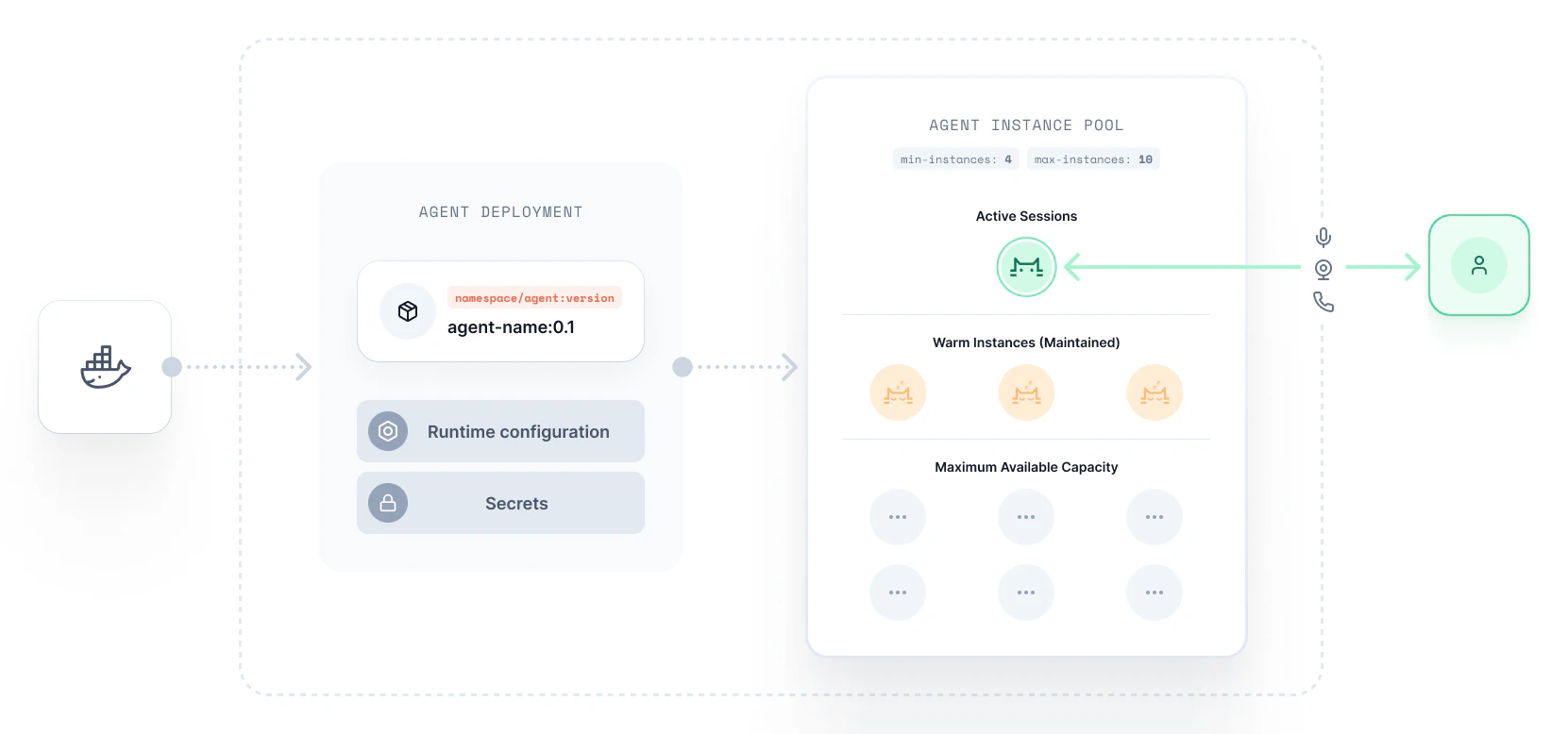 Developers can configure the upper and lower limit of a deployment's instance pool, providing a cost-effective way to handle varying loads.
### Minimum agents
`min-agents`
* Maintains specified number of warm agent instances to serve incoming requests
* Immediately ready to become active, reducing cold starts
* Defaults to `0` if unspecified
Developers can configure the upper and lower limit of a deployment's instance pool, providing a cost-effective way to handle varying loads.
### Minimum agents
`min-agents`
* Maintains specified number of warm agent instances to serve incoming requests
* Immediately ready to become active, reducing cold starts
* Defaults to `0` if unspecified
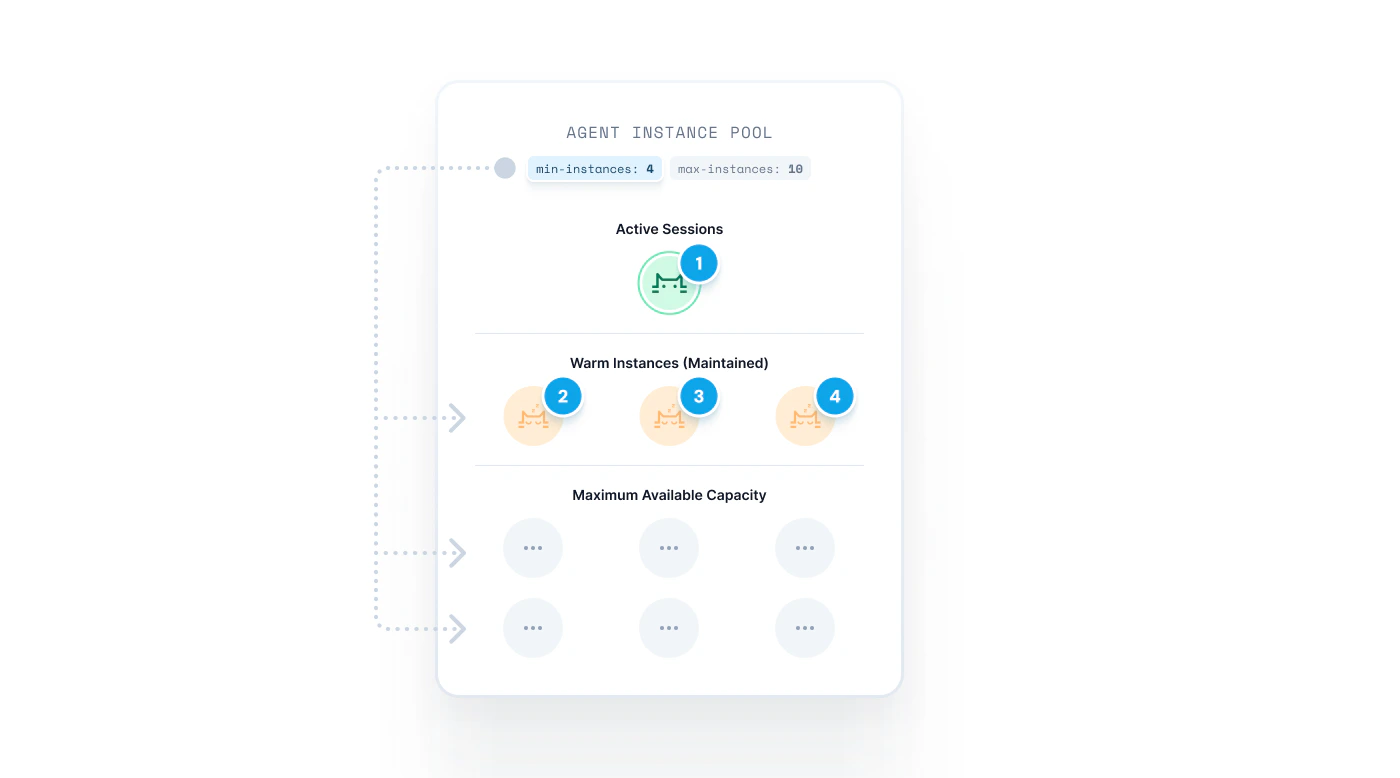 Developers specify a `min-agents` configuration to determines the number of agent instances that should be kept warm in their deployment pool. A warm instance is kept running and can immediately be used to serve an active session.
Maintaining a minimum number of agent instances is important to keep agent start times fast and reduce [cold starts](./scaling#cold-starts).
```shell theme={null}
# Defaults to zero
pipecat cloud deploy [agent-name]
# Maintain 1 warm instance at all times
pipecat cloud deploy [agent-name] --min-agents 1
```
Setting `--min-agents` to 1 or greater will incur charges even when the agent
is not in use.
### Maximum agents
`max-agents`
* Sets hard limit on concurrent sessions
* Acts as a cost control / load mechanism
* Returns HTTP 429 when pool capacity is reached
Developers specify a `min-agents` configuration to determines the number of agent instances that should be kept warm in their deployment pool. A warm instance is kept running and can immediately be used to serve an active session.
Maintaining a minimum number of agent instances is important to keep agent start times fast and reduce [cold starts](./scaling#cold-starts).
```shell theme={null}
# Defaults to zero
pipecat cloud deploy [agent-name]
# Maintain 1 warm instance at all times
pipecat cloud deploy [agent-name] --min-agents 1
```
Setting `--min-agents` to 1 or greater will incur charges even when the agent
is not in use.
### Maximum agents
`max-agents`
* Sets hard limit on concurrent sessions
* Acts as a cost control / load mechanism
* Returns HTTP 429 when pool capacity is reached
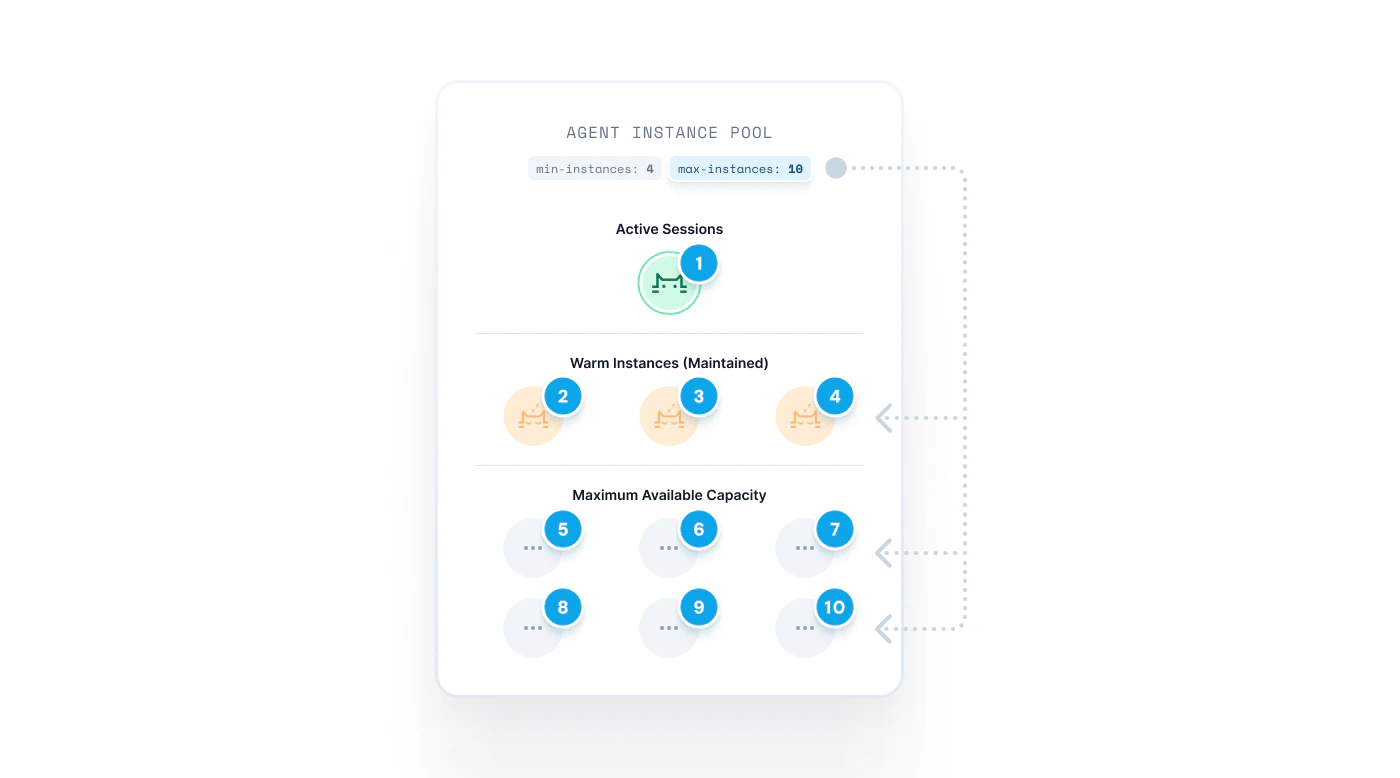 Each deployment made to Pipecat Cloud has a maximum allowed pool size of 50.
Please contact us at [help@daily.co](mailto:help@daily.co) or via
[Discord](https://discord.gg/dailyco) if you require more capacity.
Deployments can optionally be made with a `max-agents` configuration that limits the number of agent instances that your pool can contain.
This exists as a cost control measure, allowing developers to limit the total number of active sessions that can be run at any one time.
The maximum instance count is a hard limit, meaning requests made to a pool that is at capacity will receive a `429` response. See [starting sessions](./active-sessions#agent-capacity) for more information for how to handle this in your application code.
```shell theme={null}
# Limit pool to 25 active sessions running concurrently
pipecat cloud deploy [agent-name] --max-agents 25
```
### Agent lifecycle
* Provisions the minimum number of warm agent instances based on `min-agents` configuration (defaults to `0`)
* Listens for session requests to route to available agent instances
* ✅ If a warm instance is available, the session will be assigned to that instance
* ⏳ If no warm agent instances are available, and your pool is not at capacity, a new instance will be provisioned to handle the request (e.g a cold-start)
* ❌ If your pool is at capacity, your application will receive a `429` response from the start request
* The Pipecat Cloud auto-scaler determines if additional warm agent instances should be created to support further requests.
* Once a session concludes, the instance is returned to the pool and can immediately serve another session. However, if a new deployment has been pushed since the instance was created, the instance is discarded instead and will not be reused.
Your are billed for warm agent instances, even if they are not handling
active sessions. Developers should consider their deployment strategy when
cost optimizing, adjusting the minimum and maximum instance count accordingly.
See [current pricing](https://www.daily.co/pricing/pipecat-cloud) for details.
## Cold-starts
A cold start may occur when an active session request is made and no warm agent instances are available in the pool to handle it. In this case, Pipecat Cloud will provision a new instance to handle the request.
Cold starts require additional time to provision the instance and load the agent instances, which may result in a delay for the user. To minimize cold starts, you can configure your pool to maintain a minimum number of warm agent instances at all times.
Each deployment made to Pipecat Cloud has a maximum allowed pool size of 50.
Please contact us at [help@daily.co](mailto:help@daily.co) or via
[Discord](https://discord.gg/dailyco) if you require more capacity.
Deployments can optionally be made with a `max-agents` configuration that limits the number of agent instances that your pool can contain.
This exists as a cost control measure, allowing developers to limit the total number of active sessions that can be run at any one time.
The maximum instance count is a hard limit, meaning requests made to a pool that is at capacity will receive a `429` response. See [starting sessions](./active-sessions#agent-capacity) for more information for how to handle this in your application code.
```shell theme={null}
# Limit pool to 25 active sessions running concurrently
pipecat cloud deploy [agent-name] --max-agents 25
```
### Agent lifecycle
* Provisions the minimum number of warm agent instances based on `min-agents` configuration (defaults to `0`)
* Listens for session requests to route to available agent instances
* ✅ If a warm instance is available, the session will be assigned to that instance
* ⏳ If no warm agent instances are available, and your pool is not at capacity, a new instance will be provisioned to handle the request (e.g a cold-start)
* ❌ If your pool is at capacity, your application will receive a `429` response from the start request
* The Pipecat Cloud auto-scaler determines if additional warm agent instances should be created to support further requests.
* Once a session concludes, the instance is returned to the pool and can immediately serve another session. However, if a new deployment has been pushed since the instance was created, the instance is discarded instead and will not be reused.
Your are billed for warm agent instances, even if they are not handling
active sessions. Developers should consider their deployment strategy when
cost optimizing, adjusting the minimum and maximum instance count accordingly.
See [current pricing](https://www.daily.co/pricing/pipecat-cloud) for details.
## Cold-starts
A cold start may occur when an active session request is made and no warm agent instances are available in the pool to handle it. In this case, Pipecat Cloud will provision a new instance to handle the request.
Cold starts require additional time to provision the instance and load the agent instances, which may result in a delay for the user. To minimize cold starts, you can configure your pool to maintain a minimum number of warm agent instances at all times.
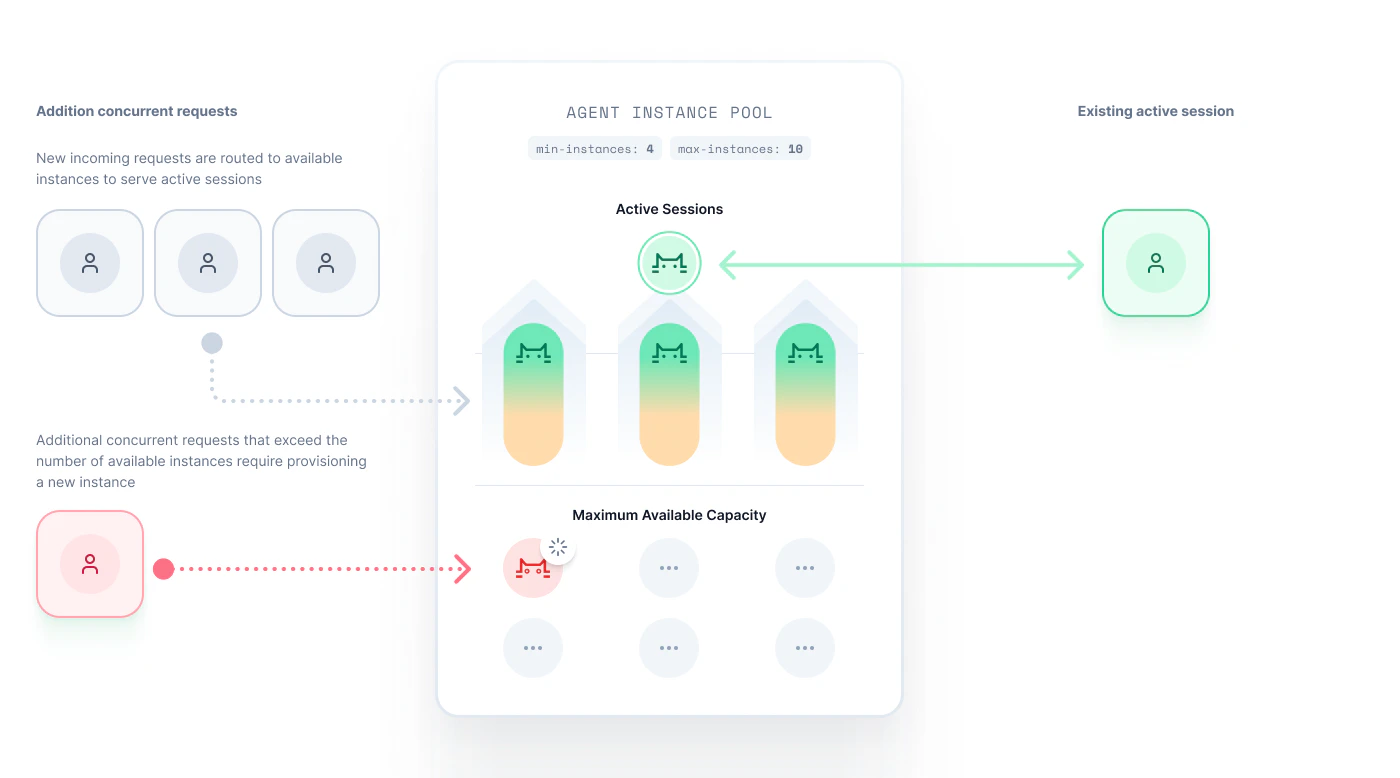 Pipecat Cloud aims to mitigate cold starts as much as possible through [auto-scaling](#auto-scaling).
The exact duration of a cold start depends on multiple factors, such as the size of your agent image and the complexity of your agent. In general, cold starts take around 10 seconds. Once you have a running instance of a deployed image, new sessions start immediately with no cold start delay.
For developers, especially during test and development, using scale-to-zero with cold starts is a good place to start as it saves money. Once you understand your utilization pattern, you can build a strategy around optimizing start times by maintaining warm agent instances.
To avoid cold starts, you can:
* Adjust the number of warm agent instances (`min-agents`) in your pool to ensure that there are always agent instances available to handle requests.
* Adjust your maximum instance count (`max-agents`) and issue capacity notifications in your application.
### Scale-to-zero
For some deployments, using a minimum instance count of 0 is preferable (e.g. while in development.) Since you are only charged for warm agents instances and active sessions, this can be a cost-effective way to manage deployments where fast start times are not required.
When the minimum instance count is set to 0, the pool will scale down to 0 agent instances when there are no active sessions. Idle agent instances are maintained for 5 minutes before being terminated.
Scale-to-zero is not recommended for production deployments where immediate
response is required.
## Auto-scaling
Pipecat Cloud performs auto-scaling by default on all deployments. Auto-scaling is accomplished through the following mechanisms:
* Scaling up based on request velocity
* Maintaining efficiency within max-agents limit
* Scaling down to min-agents (or zero) during low usage
* Supporting burst workloads automatically
### Auto-Scaling Buffer
Pipecat Cloud maintains a free auto-scaling buffer in addition to your
paid reserved agent instances. This saves you from over-provisioning warm
agent instances while still ensuring fast response times during traffic
increases.
When your traffic increases and you have active sessions running, our system automatically:
* Proactively provisions additional idle agent instances based on your current usage patterns
* Provides these buffer agent instances at no additional cost to you
* Ensures you can continue handling traffic spikes even when all your paid warm agents are in use
For example, with multiple active sessions:
* The system is already spinning up additional buffer agent instances in the background
* These buffer agent instances become available within \~10 seconds
* You can continue calling the `/start` endpoint without worrying about configuring additional capacity
This approach means:
* You can set a lower `min-agents` value than your peak traffic requirements
* You'll still avoid cold starts in most scenarios
* You get better cost efficiency without sacrificing performance
The only scenario where you need to consider higher `min-agents` values is for extremely rapid traffic spikes (tens or hundreds of calls per second) where the buffer can't be provisioned fast enough.
### Scaling Philosophy
Our scaling system is designed to minimize the need for manual capacity planning. Here's how we recommend thinking about scaling:
* **Start simple:** We encourage you to set `min-agents` to 0 initially and test how the system performs for your specific use case. Many applications work well without any pre-warmed agent instances.
* **Optimize as needed:** We work hard to make cold starts rare and as fast as possible so that, for many applications, you don't have to worry about warm instances at all.
* **Tune for traffic patterns:** If you have spiky workloads with bursty traffic patterns, setting an appropriate `min-agents` value can help prevent cold starts during critical periods. Consider scheduling higher `min-agents` values only during your peak usage hours.
Our goal is to make scaling decisions as simple as possible while giving you the controls you need for optimization when required.
## Updating scaling configuration
You can update your deployment's configuration at any time via the CLI or Pipecat Cloud Dashboard.
```shell theme={null}
pipecat cloud deploy [agent-name] [image] --min-agents 1 --max-agents 5
```
Please note that changing your scaling parameters will not disrupt any active sessions.
If you reduce your max instance count below the number of currently active sessions, you will still be billed for the duration of those sessions.
## Capacity Planning
Effective capacity planning is crucial for production deployments to ensure your agents respond immediately.
Pipecat Cloud auto-scales your agents. For most cases, the only action you need to take is to set the `--min-agents` parameter to 1. However, if your application experiences fluctuations in traffic, you may need to plan for additional warm capacity to ensure your agents are always ready to respond immediately.
See our guide for calculating reserved agents, understanding warm capacity,
and implementing scaling strategies for production.
## Usage summary
Pipecat Cloud bills based on:
* **Active session minutes**: Time your agents spend handling live sessions
* **Reserved session minutes**: Time your warm agent instances are kept running, even when idle
An active session starts when you call the `/start` endpoint (or CLI or SDK equivalent) and ends when your agent's pipeline shuts down.
Reserved session minutes are optional and controlled by setting `--min-agents` in your deployment configuration.
Both active and reserved session time is measured to the second and billed in
minutes.
## Controlling costs
Most surprise charges come from **reserved session minutes**: a warm instance bills around the clock whether or not anyone uses it. The levers below are ordered from most to least impactful.
### Scale-to-zero in development
If you don't need instant start times while testing, set `min-agents` to 0 to remove all reserved charges. The first call after an idle period takes a \~10-second [cold start](#cold-starts); subsequent calls are instant while an instance stays warm.
```shell theme={null}
pipecat cloud deploy [agent-name] --min-agents 0
```
Each warm instance bills around the clock. A single instance kept warm with
`--min-agents 1` accrues 1,440 reserved minutes a day, even with zero active
sessions.
### Right-size min-agents in production
For production, set `min-agents` to cover your baseline traffic and let the free [auto-scaling buffer](#auto-scaling-buffer) handle spikes. See [Capacity Planning](../guides/capacity-planning) for how to pick the number.
### Cap concurrency with max-agents
`max-agents` sets a hard limit on how many instances, and therefore concurrent sessions, your pool can run. It doubles as a cost ceiling: requests past the limit get a `429` instead of spinning up more paid instances.
```shell theme={null}
pipecat cloud deploy [agent-name] --max-agents 25
```
### Cap runaway sessions with max-session-duration
A buggy agent that never ends its pipeline can rack up active minutes. Set `--max-session-duration` as a safety net so any session is force-closed after a set time.
```shell theme={null}
# Force-close any session after 5 minutes
pipecat cloud deploy [agent-name] --max-session-duration 300
```
See [session duration limits](./active-sessions#session-duration-limits) for the default and allowed range.
### Delete deployments you are not using
A deployment with warm instances accrues reserved charges until you delete it. If you're done with an app, delete the deployment.
### Set a spend limit as a backstop
As a final safety net, set a spend limit in the Pipecat Cloud Dashboard under **Settings > Billing**. It caps the damage from a misconfiguration but doesn't replace right-sizing `min-agents`.
Pipecat Cloud aims to mitigate cold starts as much as possible through [auto-scaling](#auto-scaling).
The exact duration of a cold start depends on multiple factors, such as the size of your agent image and the complexity of your agent. In general, cold starts take around 10 seconds. Once you have a running instance of a deployed image, new sessions start immediately with no cold start delay.
For developers, especially during test and development, using scale-to-zero with cold starts is a good place to start as it saves money. Once you understand your utilization pattern, you can build a strategy around optimizing start times by maintaining warm agent instances.
To avoid cold starts, you can:
* Adjust the number of warm agent instances (`min-agents`) in your pool to ensure that there are always agent instances available to handle requests.
* Adjust your maximum instance count (`max-agents`) and issue capacity notifications in your application.
### Scale-to-zero
For some deployments, using a minimum instance count of 0 is preferable (e.g. while in development.) Since you are only charged for warm agents instances and active sessions, this can be a cost-effective way to manage deployments where fast start times are not required.
When the minimum instance count is set to 0, the pool will scale down to 0 agent instances when there are no active sessions. Idle agent instances are maintained for 5 minutes before being terminated.
Scale-to-zero is not recommended for production deployments where immediate
response is required.
## Auto-scaling
Pipecat Cloud performs auto-scaling by default on all deployments. Auto-scaling is accomplished through the following mechanisms:
* Scaling up based on request velocity
* Maintaining efficiency within max-agents limit
* Scaling down to min-agents (or zero) during low usage
* Supporting burst workloads automatically
### Auto-Scaling Buffer
Pipecat Cloud maintains a free auto-scaling buffer in addition to your
paid reserved agent instances. This saves you from over-provisioning warm
agent instances while still ensuring fast response times during traffic
increases.
When your traffic increases and you have active sessions running, our system automatically:
* Proactively provisions additional idle agent instances based on your current usage patterns
* Provides these buffer agent instances at no additional cost to you
* Ensures you can continue handling traffic spikes even when all your paid warm agents are in use
For example, with multiple active sessions:
* The system is already spinning up additional buffer agent instances in the background
* These buffer agent instances become available within \~10 seconds
* You can continue calling the `/start` endpoint without worrying about configuring additional capacity
This approach means:
* You can set a lower `min-agents` value than your peak traffic requirements
* You'll still avoid cold starts in most scenarios
* You get better cost efficiency without sacrificing performance
The only scenario where you need to consider higher `min-agents` values is for extremely rapid traffic spikes (tens or hundreds of calls per second) where the buffer can't be provisioned fast enough.
### Scaling Philosophy
Our scaling system is designed to minimize the need for manual capacity planning. Here's how we recommend thinking about scaling:
* **Start simple:** We encourage you to set `min-agents` to 0 initially and test how the system performs for your specific use case. Many applications work well without any pre-warmed agent instances.
* **Optimize as needed:** We work hard to make cold starts rare and as fast as possible so that, for many applications, you don't have to worry about warm instances at all.
* **Tune for traffic patterns:** If you have spiky workloads with bursty traffic patterns, setting an appropriate `min-agents` value can help prevent cold starts during critical periods. Consider scheduling higher `min-agents` values only during your peak usage hours.
Our goal is to make scaling decisions as simple as possible while giving you the controls you need for optimization when required.
## Updating scaling configuration
You can update your deployment's configuration at any time via the CLI or Pipecat Cloud Dashboard.
```shell theme={null}
pipecat cloud deploy [agent-name] [image] --min-agents 1 --max-agents 5
```
Please note that changing your scaling parameters will not disrupt any active sessions.
If you reduce your max instance count below the number of currently active sessions, you will still be billed for the duration of those sessions.
## Capacity Planning
Effective capacity planning is crucial for production deployments to ensure your agents respond immediately.
Pipecat Cloud auto-scales your agents. For most cases, the only action you need to take is to set the `--min-agents` parameter to 1. However, if your application experiences fluctuations in traffic, you may need to plan for additional warm capacity to ensure your agents are always ready to respond immediately.
See our guide for calculating reserved agents, understanding warm capacity,
and implementing scaling strategies for production.
## Usage summary
Pipecat Cloud bills based on:
* **Active session minutes**: Time your agents spend handling live sessions
* **Reserved session minutes**: Time your warm agent instances are kept running, even when idle
An active session starts when you call the `/start` endpoint (or CLI or SDK equivalent) and ends when your agent's pipeline shuts down.
Reserved session minutes are optional and controlled by setting `--min-agents` in your deployment configuration.
Both active and reserved session time is measured to the second and billed in
minutes.
## Controlling costs
Most surprise charges come from **reserved session minutes**: a warm instance bills around the clock whether or not anyone uses it. The levers below are ordered from most to least impactful.
### Scale-to-zero in development
If you don't need instant start times while testing, set `min-agents` to 0 to remove all reserved charges. The first call after an idle period takes a \~10-second [cold start](#cold-starts); subsequent calls are instant while an instance stays warm.
```shell theme={null}
pipecat cloud deploy [agent-name] --min-agents 0
```
Each warm instance bills around the clock. A single instance kept warm with
`--min-agents 1` accrues 1,440 reserved minutes a day, even with zero active
sessions.
### Right-size min-agents in production
For production, set `min-agents` to cover your baseline traffic and let the free [auto-scaling buffer](#auto-scaling-buffer) handle spikes. See [Capacity Planning](../guides/capacity-planning) for how to pick the number.
### Cap concurrency with max-agents
`max-agents` sets a hard limit on how many instances, and therefore concurrent sessions, your pool can run. It doubles as a cost ceiling: requests past the limit get a `429` instead of spinning up more paid instances.
```shell theme={null}
pipecat cloud deploy [agent-name] --max-agents 25
```
### Cap runaway sessions with max-session-duration
A buggy agent that never ends its pipeline can rack up active minutes. Set `--max-session-duration` as a safety net so any session is force-closed after a set time.
```shell theme={null}
# Force-close any session after 5 minutes
pipecat cloud deploy [agent-name] --max-session-duration 300
```
See [session duration limits](./active-sessions#session-duration-limits) for the default and allowed range.
### Delete deployments you are not using
A deployment with warm instances accrues reserved charges until you delete it. If you're done with an app, delete the deployment.
### Set a spend limit as a backstop
As a final safety net, set a spend limit in the Pipecat Cloud Dashboard under **Settings > Billing**. It caps the damage from a misconfiguration but doesn't replace right-sizing `min-agents`.