> ## Documentation Index
> Fetch the complete documentation index at: https://docs.pipecat.ai/llms.txt
> Use this file to discover all available pages before exploring further.
# Session API
> Send HTTP requests to your running Pipecat Cloud sessions
The Session API lets you send HTTP requests directly to your running Pipecat Cloud agents. This enables real-time control and data exchange with active sessions, such as updating conversation context, triggering actions, or retrieving session state.
## How It Works
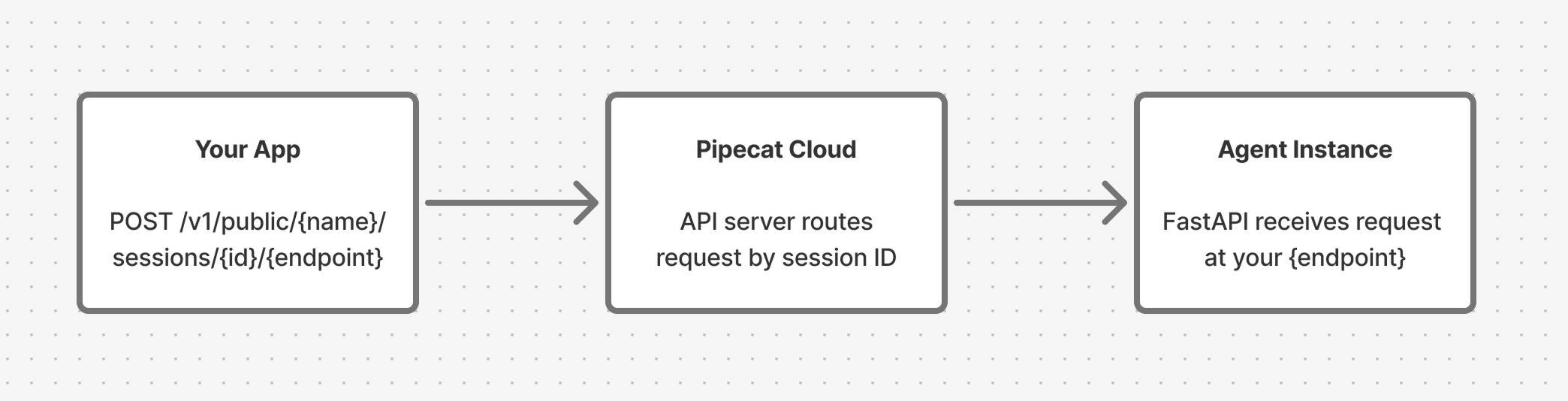
Your bot runs inside a [FastAPI](https://fastapi.tiangolo.com/) server managed by the Pipecat Cloud base image. When you define custom endpoints using the `app` object from `pipecatcloud_system`, they become reachable through the Session API.
Requests are proxied through Pipecat Cloud to the specific bot instance handling your session:
 To use the Session API:
[Start a session](/pipecat-cloud/fundamentals/active-sessions) with your
agent and capture the `sessionId` from the response.
Add custom routes to the `app` object from `pipecatcloud_system` in your
`bot.py`.
Make HTTP requests to the session endpoint. Pipecat Cloud routes them to the
bot instance for that session.
## Endpoint Format
```
https://api.pipecat.daily.co/v1/public/{service_name}/sessions/{session_id}/{path}
```
| Parameter | Description |
| -------------- | --------------------------------------------- |
| `service_name` | The name of your deployed agent |
| `session_id` | The `sessionId` value from the start response |
| `path` | The endpoint path you defined in your bot |
### Supported Methods
`GET`, `POST`, `PUT`, `PATCH`, `DELETE`, `OPTIONS`, `HEAD`
## Authentication
Include your Pipecat Cloud public API key in the `Authorization` header:
```bash theme={null}
Authorization: Bearer pk_...
```
## Setting Up Your Bot
Define endpoints in your `bot.py` using the `app` object from `pipecatcloud_system`. This is the same FastAPI application that serves your bot, so your custom routes run alongside the built-in ones.
```python theme={null}
from pipecatcloud_system import app
@app.get("/status")
async def get_status():
return {"status": "active"}
@app.post("/context")
async def update_context(data: dict):
return {"updated": True}
```
Requires base image version `0.1.2` or later.
### Connecting Endpoints to Your Pipeline
Most Session API use cases require your endpoint to interact with the running pipeline. The pattern is:
1. Store a reference to your [`PipelineWorker`](/api-reference/server/pipeline/pipeline-worker) in a module-level variable
2. Access it from your endpoint handler to [queue frames](/api-reference/server/pipeline/pipeline-worker#frame-management) into the pipeline
```python theme={null}
from pipecatcloud_system import app
from pipecat.pipeline.worker import PipelineWorker
# Module-level reference to the running pipeline worker
pipeline_worker: PipelineWorker | None = None
async def bot(args):
global pipeline_worker
# ... set up your pipeline ...
pipeline_worker = worker
runner = WorkerRunner()
await runner.run(worker)
pipeline_worker = None
@app.post("/context")
async def update_context(data: dict):
if not pipeline_worker:
return {"error": "No active pipeline"}, 503
# Use pipeline_worker.queue_frame() to inject frames
# ...
```
Since Pipecat Cloud runs one session per pod, a single module-level variable
works well. You don't need to key by session ID.
## Examples
### Update Conversation Context
Use [`LLMMessagesAppendFrame`](/api-reference/server/pipeline/pipeline-worker#frame-management) to add messages to the LLM's conversation context from an HTTP request. Setting `run_llm=True` tells the pipeline to immediately send the updated context to the LLM for a response.
```python theme={null}
from pipecatcloud_system import app
from pydantic import BaseModel
from pipecat.pipeline.worker import PipelineWorker
from pipecat.workers.runner import WorkerRunner
from pipecat.frames.frames import LLMMessagesAppendFrame
pipeline_worker: PipelineWorker | None = None
class ContextUpdate(BaseModel):
user_name: str
preferences: dict
@app.post("/context")
async def update_context(update: ContextUpdate):
if not pipeline_worker:
return {"error": "No active pipeline"}, 503
# Inject a developer message into the conversation
await pipeline_worker.queue_frame(
LLMMessagesAppendFrame(
messages=[{
"role": "developer",
"content": (
f"The user's name is {update.user_name}. "
f"Their preferences: {update.preferences}"
),
}],
run_llm=False, # Don't trigger a response yet
)
)
return {"status": "context updated", "user_name": update.user_name}
async def bot(args):
global pipeline_worker
# ... set up your pipeline ...
pipeline_worker = worker
runner = WorkerRunner()
await runner.run(worker)
pipeline_worker = None
```
Call the endpoint:
```bash theme={null}
curl -X POST \
'https://api.pipecat.daily.co/v1/public/my-agent/sessions/{session_id}/context' \
-H 'Authorization: Bearer pk_...' \
-H 'Content-Type: application/json' \
-d '{"user_name": "Alice", "preferences": {"language": "Spanish"}}'
```
### Trigger the Bot to Speak
Use [`TTSSpeakFrame`](/api-reference/server/pipeline/pipeline-worker#frame-management) to make the bot say something on demand:
```python theme={null}
from pipecatcloud_system import app
from pydantic import BaseModel
from pipecat.pipeline.worker import PipelineWorker
from pipecat.workers.runner import WorkerRunner
from pipecat.frames.frames import TTSSpeakFrame
pipeline_worker: PipelineWorker | None = None
class SpeakRequest(BaseModel):
message: str
@app.post("/speak")
async def trigger_speech(req: SpeakRequest):
if not pipeline_worker:
return {"error": "No active pipeline"}, 503
await pipeline_worker.queue_frame(TTSSpeakFrame(text=req.message))
return {"queued": True, "message": req.message}
async def bot(args):
global pipeline_worker
# ... set up your pipeline ...
pipeline_worker = worker
runner = WorkerRunner()
await runner.run(worker)
pipeline_worker = None
```
Call the endpoint:
```bash theme={null}
curl -X POST \
'https://api.pipecat.daily.co/v1/public/my-agent/sessions/{session_id}/speak' \
-H 'Authorization: Bearer pk_...' \
-H 'Content-Type: application/json' \
-d '{"message": "Hello Alice, welcome back!"}'
```
### Get Session Status
Endpoints don't have to interact with the pipeline. You can also use them to expose any state your bot tracks:
```python theme={null}
from pipecatcloud_system import app
session_data = {"messages": [], "user_name": None}
@app.get("/status")
async def get_status():
return {
"message_count": len(session_data["messages"]),
"user_name": session_data["user_name"],
}
```
```bash theme={null}
curl -X GET \
'https://api.pipecat.daily.co/v1/public/my-agent/sessions/{session_id}/status' \
-H 'Authorization: Bearer pk_...'
```
## Important Notes
* **Startup latency**: If you call the Session API before your bot finishes initializing, the request may take longer while waiting for the bot to become available.
* **Session scope**: Each request is routed to the specific bot instance identified by `session_id`. Different sessions are separate pods and don't share state.
* **Error handling**: If a session has ended or the session ID is invalid, you'll receive an error response.
* **Reserved paths**: The base image uses `/bot`, `/ws`, `/api/offer`, `/whatsapp`, `/readyz`, and `/livez`. Don't define endpoints at these paths.
## Getting Help
If you have questions about the Session API, reach out on [Discord](https://discord.gg/pipecat).
To use the Session API:
[Start a session](/pipecat-cloud/fundamentals/active-sessions) with your
agent and capture the `sessionId` from the response.
Add custom routes to the `app` object from `pipecatcloud_system` in your
`bot.py`.
Make HTTP requests to the session endpoint. Pipecat Cloud routes them to the
bot instance for that session.
## Endpoint Format
```
https://api.pipecat.daily.co/v1/public/{service_name}/sessions/{session_id}/{path}
```
| Parameter | Description |
| -------------- | --------------------------------------------- |
| `service_name` | The name of your deployed agent |
| `session_id` | The `sessionId` value from the start response |
| `path` | The endpoint path you defined in your bot |
### Supported Methods
`GET`, `POST`, `PUT`, `PATCH`, `DELETE`, `OPTIONS`, `HEAD`
## Authentication
Include your Pipecat Cloud public API key in the `Authorization` header:
```bash theme={null}
Authorization: Bearer pk_...
```
## Setting Up Your Bot
Define endpoints in your `bot.py` using the `app` object from `pipecatcloud_system`. This is the same FastAPI application that serves your bot, so your custom routes run alongside the built-in ones.
```python theme={null}
from pipecatcloud_system import app
@app.get("/status")
async def get_status():
return {"status": "active"}
@app.post("/context")
async def update_context(data: dict):
return {"updated": True}
```
Requires base image version `0.1.2` or later.
### Connecting Endpoints to Your Pipeline
Most Session API use cases require your endpoint to interact with the running pipeline. The pattern is:
1. Store a reference to your [`PipelineWorker`](/api-reference/server/pipeline/pipeline-worker) in a module-level variable
2. Access it from your endpoint handler to [queue frames](/api-reference/server/pipeline/pipeline-worker#frame-management) into the pipeline
```python theme={null}
from pipecatcloud_system import app
from pipecat.pipeline.worker import PipelineWorker
# Module-level reference to the running pipeline worker
pipeline_worker: PipelineWorker | None = None
async def bot(args):
global pipeline_worker
# ... set up your pipeline ...
pipeline_worker = worker
runner = WorkerRunner()
await runner.run(worker)
pipeline_worker = None
@app.post("/context")
async def update_context(data: dict):
if not pipeline_worker:
return {"error": "No active pipeline"}, 503
# Use pipeline_worker.queue_frame() to inject frames
# ...
```
Since Pipecat Cloud runs one session per pod, a single module-level variable
works well. You don't need to key by session ID.
## Examples
### Update Conversation Context
Use [`LLMMessagesAppendFrame`](/api-reference/server/pipeline/pipeline-worker#frame-management) to add messages to the LLM's conversation context from an HTTP request. Setting `run_llm=True` tells the pipeline to immediately send the updated context to the LLM for a response.
```python theme={null}
from pipecatcloud_system import app
from pydantic import BaseModel
from pipecat.pipeline.worker import PipelineWorker
from pipecat.workers.runner import WorkerRunner
from pipecat.frames.frames import LLMMessagesAppendFrame
pipeline_worker: PipelineWorker | None = None
class ContextUpdate(BaseModel):
user_name: str
preferences: dict
@app.post("/context")
async def update_context(update: ContextUpdate):
if not pipeline_worker:
return {"error": "No active pipeline"}, 503
# Inject a developer message into the conversation
await pipeline_worker.queue_frame(
LLMMessagesAppendFrame(
messages=[{
"role": "developer",
"content": (
f"The user's name is {update.user_name}. "
f"Their preferences: {update.preferences}"
),
}],
run_llm=False, # Don't trigger a response yet
)
)
return {"status": "context updated", "user_name": update.user_name}
async def bot(args):
global pipeline_worker
# ... set up your pipeline ...
pipeline_worker = worker
runner = WorkerRunner()
await runner.run(worker)
pipeline_worker = None
```
Call the endpoint:
```bash theme={null}
curl -X POST \
'https://api.pipecat.daily.co/v1/public/my-agent/sessions/{session_id}/context' \
-H 'Authorization: Bearer pk_...' \
-H 'Content-Type: application/json' \
-d '{"user_name": "Alice", "preferences": {"language": "Spanish"}}'
```
### Trigger the Bot to Speak
Use [`TTSSpeakFrame`](/api-reference/server/pipeline/pipeline-worker#frame-management) to make the bot say something on demand:
```python theme={null}
from pipecatcloud_system import app
from pydantic import BaseModel
from pipecat.pipeline.worker import PipelineWorker
from pipecat.workers.runner import WorkerRunner
from pipecat.frames.frames import TTSSpeakFrame
pipeline_worker: PipelineWorker | None = None
class SpeakRequest(BaseModel):
message: str
@app.post("/speak")
async def trigger_speech(req: SpeakRequest):
if not pipeline_worker:
return {"error": "No active pipeline"}, 503
await pipeline_worker.queue_frame(TTSSpeakFrame(text=req.message))
return {"queued": True, "message": req.message}
async def bot(args):
global pipeline_worker
# ... set up your pipeline ...
pipeline_worker = worker
runner = WorkerRunner()
await runner.run(worker)
pipeline_worker = None
```
Call the endpoint:
```bash theme={null}
curl -X POST \
'https://api.pipecat.daily.co/v1/public/my-agent/sessions/{session_id}/speak' \
-H 'Authorization: Bearer pk_...' \
-H 'Content-Type: application/json' \
-d '{"message": "Hello Alice, welcome back!"}'
```
### Get Session Status
Endpoints don't have to interact with the pipeline. You can also use them to expose any state your bot tracks:
```python theme={null}
from pipecatcloud_system import app
session_data = {"messages": [], "user_name": None}
@app.get("/status")
async def get_status():
return {
"message_count": len(session_data["messages"]),
"user_name": session_data["user_name"],
}
```
```bash theme={null}
curl -X GET \
'https://api.pipecat.daily.co/v1/public/my-agent/sessions/{session_id}/status' \
-H 'Authorization: Bearer pk_...'
```
## Important Notes
* **Startup latency**: If you call the Session API before your bot finishes initializing, the request may take longer while waiting for the bot to become available.
* **Session scope**: Each request is routed to the specific bot instance identified by `session_id`. Different sessions are separate pods and don't share state.
* **Error handling**: If a session has ended or the session ID is invalid, you'll receive an error response.
* **Reserved paths**: The base image uses `/bot`, `/ws`, `/api/offer`, `/whatsapp`, `/readyz`, and `/livez`. Don't define endpoints at these paths.
## Getting Help
If you have questions about the Session API, reach out on [Discord](https://discord.gg/pipecat).