> ## Documentation Index
> Fetch the complete documentation index at: https://docs.pipecat.ai/llms.txt
> Use this file to discover all available pages before exploring further.
# Arize
> Observability and online evaluation for Pipecat voice agents, powered by OpenInference auto-instrumentation and OpenTelemetry.
## Overview
[Arize](https://arize.com) provides AI observability and evaluation for agents in development and production. It comes in two products that share the same OpenTelemetry and OpenInference foundation: [Arize AX](https://arize.com/docs/ax), the hosted platform that gives AI engineers and product managers the tools to observe, improve, and evaluate their AI agents and applications, and [Phoenix](https://arize.com/docs/phoenix), the open-source AI observability platform for experimentation, evaluation, and troubleshooting.
Arize maintains a Pipecat instrumentor, [`openinference-instrumentation-pipecat`](https://github.com/Arize-ai/openinference/tree/main/python/instrumentation/openinference-instrumentation-pipecat), that auto-traces a running pipeline. It's built on [OpenInference](https://github.com/Arize-ai/openinference), a set of OpenTelemetry-compatible semantic conventions for AI, so spans land in Arize AX, Phoenix, or any OpenTelemetry backend, complementing Pipecat's built-in [OpenTelemetry tracing](/api-reference/server/utilities/opentelemetry). See the [Pipecat tracing guide](https://arize.com/docs/ax/integrations/python-agent-frameworks/pipecat/pipecat-tracing) for the full integration.
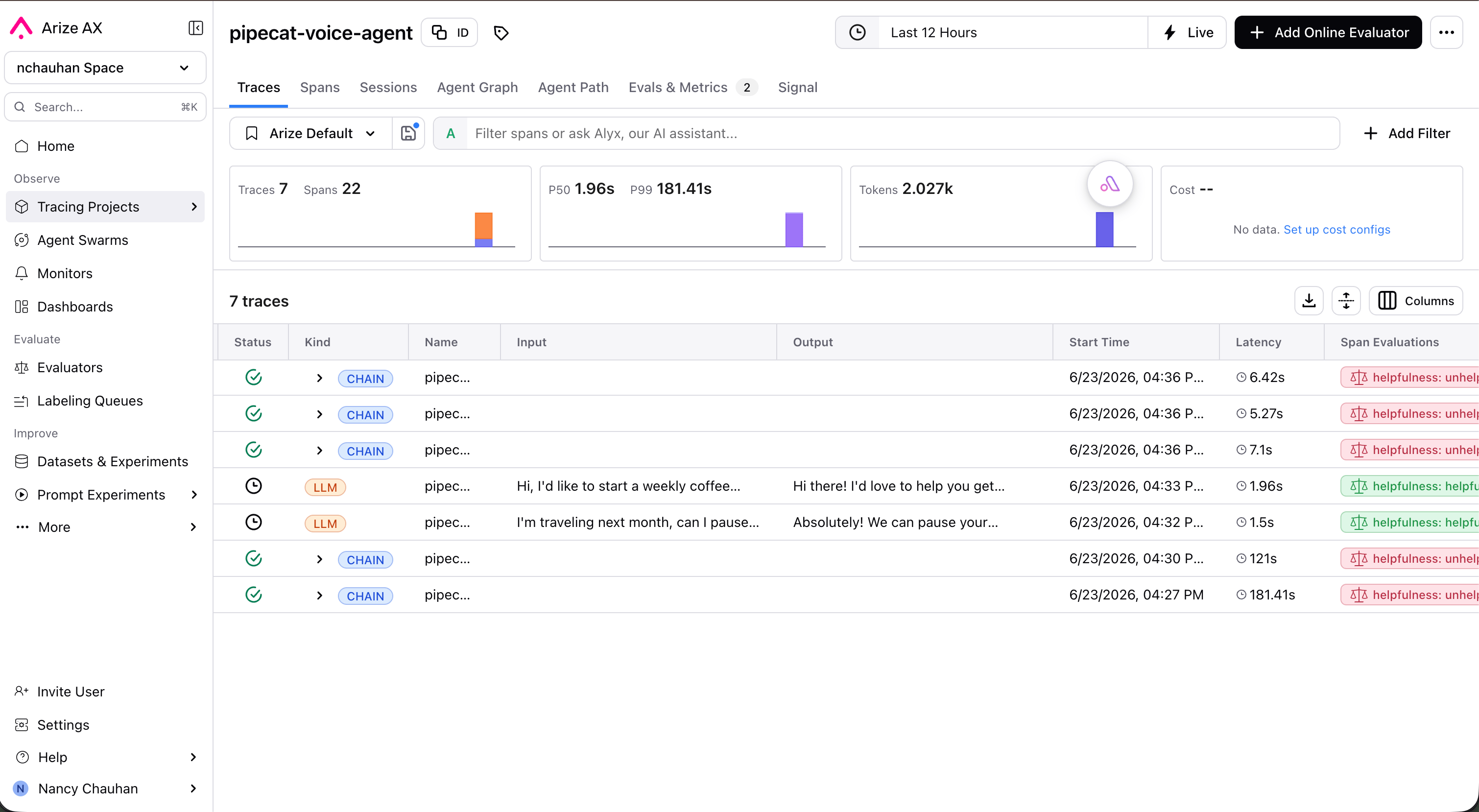
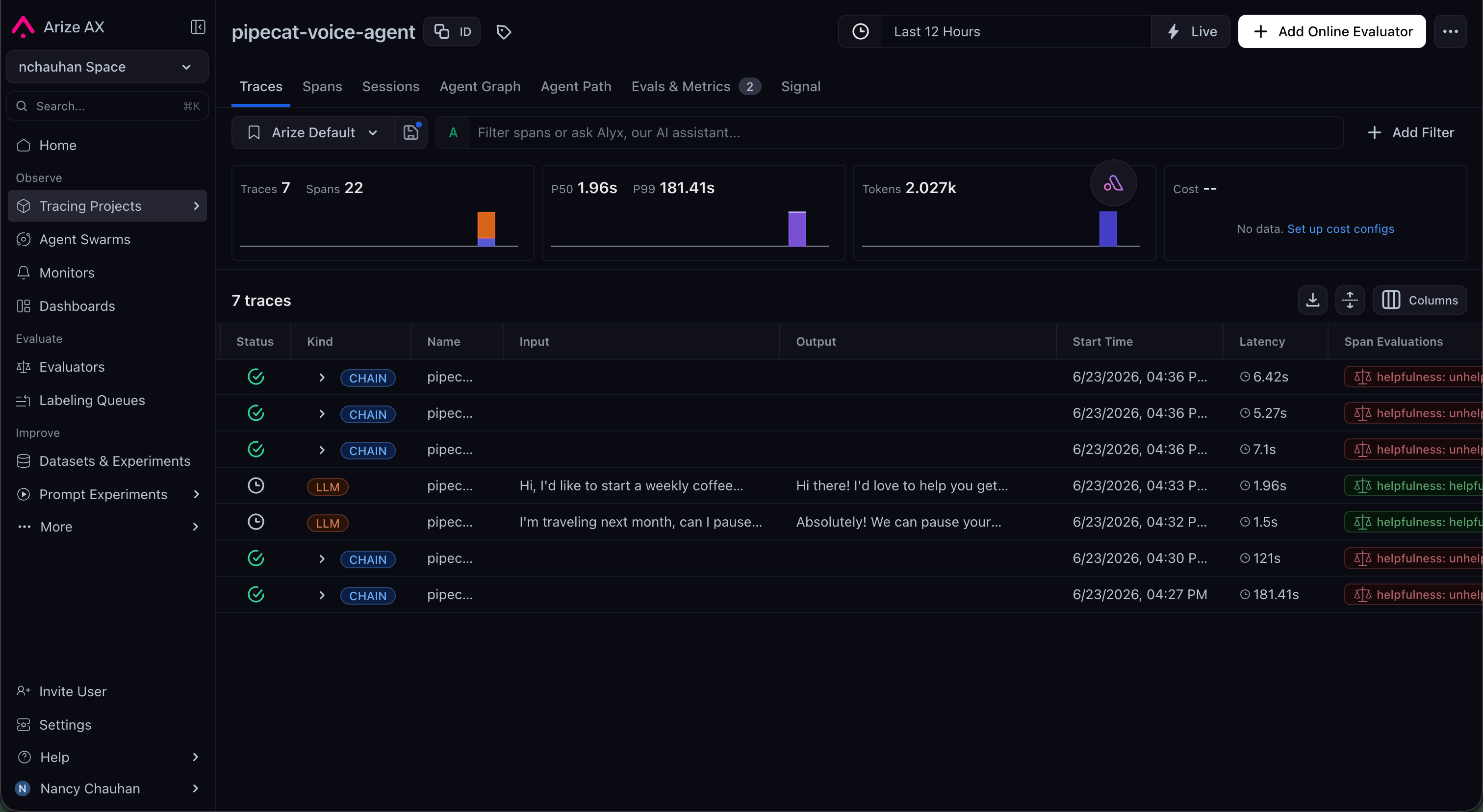 With Arize, you can:
* Auto-instrument a Pipecat agent with a few lines at startup, no manual span code required
* Trace every turn, with STT, LLM, TTS, and tool spans grouped by conversation
* Align transcripts, tool calls, and per-stage latency in a single timeline to find bottlenecks
* Run LLM-as-a-judge evaluations (hallucination, correctness, relevance, task completion) over live traffic
* Track quality over time with dashboards and monitors, and alert on drift or regressions
## Connect your Pipecat agent
Install the instrumentor plus the OTel SDK for your backend (`arize-otel` for Arize AX, or `arize-phoenix-otel` for Phoenix):
```bash theme={null}
# Arize AX
pip install openinference-instrumentation-pipecat pipecat-ai arize-otel
# Phoenix (open source)
pip install openinference-instrumentation-pipecat pipecat-ai arize-phoenix-otel
```
Register a tracer provider and instrument Pipecat once at application startup, before you build your pipeline. Pass a `conversation_id` to `PipelineWorker` so spans are grouped per session.
```python Arize AX theme={null}
import os
from arize.otel import register
from openinference.instrumentation.pipecat import PipecatInstrumentor
# Send traces to Arize AX
tracer_provider = register(
space_id=os.environ["ARIZE_SPACE_ID"],
api_key=os.environ["ARIZE_API_KEY"],
project_name="my-voice-agent",
)
PipecatInstrumentor().instrument(tracer_provider=tracer_provider)
# Build your pipeline as usual; spans now export to Arize AX.
pipeline = Pipeline(...)
worker = PipelineWorker(pipeline, conversation_id=conversation_id)
```
```python Phoenix (open source) theme={null}
from phoenix.otel import register
from openinference.instrumentation.pipecat import PipecatInstrumentor
# Send traces to Phoenix (local or self-hosted)
tracer_provider = register(project_name="my-voice-agent")
PipecatInstrumentor().instrument(tracer_provider=tracer_provider)
pipeline = Pipeline(...)
worker = PipelineWorker(pipeline, conversation_id=conversation_id)
```
That's it. Run your agent and conversations show up in your Arize project. Because the instrumentor speaks OpenTelemetry, you can also point it at any other OTel-compatible collector by configuring the tracer provider accordingly.
The instrumentor requires `pipecat-ai>=1.3` and Python 3.11+. Instrument
before the pipeline is constructed so worker spans are captured from the
first turn.
## What gets traced
The instrumentor converts Pipecat's pipeline activity into OpenInference spans, so each conversation becomes a structured trace in Arize. As described in the [Pipecat tracing guide](https://arize.com/docs/ax/integrations/python-agent-frameworks/pipecat/pipecat-tracing), it captures:
* **Conversation sessions**, grouping all turns that share a `conversation_id`
* **Turn boundaries**, with each user-to-assistant exchange as a parent span
* **LLM calls** with prompts, responses, token counts, and model metadata
* **Speech-to-text and text-to-speech** spans with their input/output and latency
* **Tool and function calls** with inputs, outputs, and duration
* **End-to-end and per-stage latency**, with failures surfaced as span errors
## Online evaluation
Beyond tracing, Arize runs evaluations on the traces it collects, the "evals" part of the workflow. You define an LLM-as-judge (a prompt plus an output label), and Arize scores spans automatically as traffic flows in:
* Pre-built and custom judges for hallucination, correctness, relevance, and task completion
* Continuous evaluation of live traffic, with scores attached back to the originating spans
* Dashboards and monitors that track eval scores over time and alert on quality drift
With Arize, you can:
* Auto-instrument a Pipecat agent with a few lines at startup, no manual span code required
* Trace every turn, with STT, LLM, TTS, and tool spans grouped by conversation
* Align transcripts, tool calls, and per-stage latency in a single timeline to find bottlenecks
* Run LLM-as-a-judge evaluations (hallucination, correctness, relevance, task completion) over live traffic
* Track quality over time with dashboards and monitors, and alert on drift or regressions
## Connect your Pipecat agent
Install the instrumentor plus the OTel SDK for your backend (`arize-otel` for Arize AX, or `arize-phoenix-otel` for Phoenix):
```bash theme={null}
# Arize AX
pip install openinference-instrumentation-pipecat pipecat-ai arize-otel
# Phoenix (open source)
pip install openinference-instrumentation-pipecat pipecat-ai arize-phoenix-otel
```
Register a tracer provider and instrument Pipecat once at application startup, before you build your pipeline. Pass a `conversation_id` to `PipelineWorker` so spans are grouped per session.
```python Arize AX theme={null}
import os
from arize.otel import register
from openinference.instrumentation.pipecat import PipecatInstrumentor
# Send traces to Arize AX
tracer_provider = register(
space_id=os.environ["ARIZE_SPACE_ID"],
api_key=os.environ["ARIZE_API_KEY"],
project_name="my-voice-agent",
)
PipecatInstrumentor().instrument(tracer_provider=tracer_provider)
# Build your pipeline as usual; spans now export to Arize AX.
pipeline = Pipeline(...)
worker = PipelineWorker(pipeline, conversation_id=conversation_id)
```
```python Phoenix (open source) theme={null}
from phoenix.otel import register
from openinference.instrumentation.pipecat import PipecatInstrumentor
# Send traces to Phoenix (local or self-hosted)
tracer_provider = register(project_name="my-voice-agent")
PipecatInstrumentor().instrument(tracer_provider=tracer_provider)
pipeline = Pipeline(...)
worker = PipelineWorker(pipeline, conversation_id=conversation_id)
```
That's it. Run your agent and conversations show up in your Arize project. Because the instrumentor speaks OpenTelemetry, you can also point it at any other OTel-compatible collector by configuring the tracer provider accordingly.
The instrumentor requires `pipecat-ai>=1.3` and Python 3.11+. Instrument
before the pipeline is constructed so worker spans are captured from the
first turn.
## What gets traced
The instrumentor converts Pipecat's pipeline activity into OpenInference spans, so each conversation becomes a structured trace in Arize. As described in the [Pipecat tracing guide](https://arize.com/docs/ax/integrations/python-agent-frameworks/pipecat/pipecat-tracing), it captures:
* **Conversation sessions**, grouping all turns that share a `conversation_id`
* **Turn boundaries**, with each user-to-assistant exchange as a parent span
* **LLM calls** with prompts, responses, token counts, and model metadata
* **Speech-to-text and text-to-speech** spans with their input/output and latency
* **Tool and function calls** with inputs, outputs, and duration
* **End-to-end and per-stage latency**, with failures surfaced as span errors
## Online evaluation
Beyond tracing, Arize runs evaluations on the traces it collects, the "evals" part of the workflow. You define an LLM-as-judge (a prompt plus an output label), and Arize scores spans automatically as traffic flows in:
* Pre-built and custom judges for hallucination, correctness, relevance, and task completion
* Continuous evaluation of live traffic, with scores attached back to the originating spans
* Dashboards and monitors that track eval scores over time and alert on quality drift
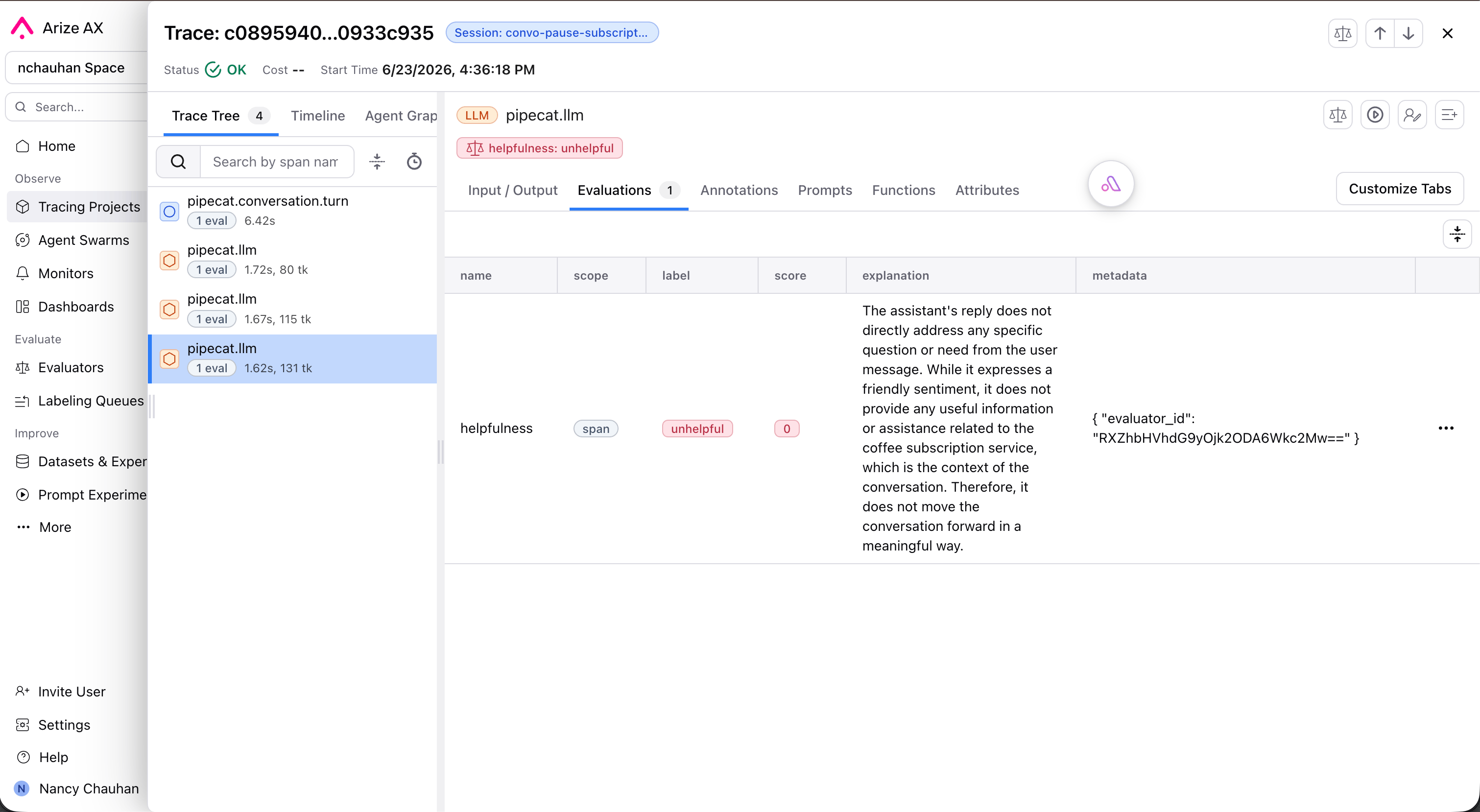
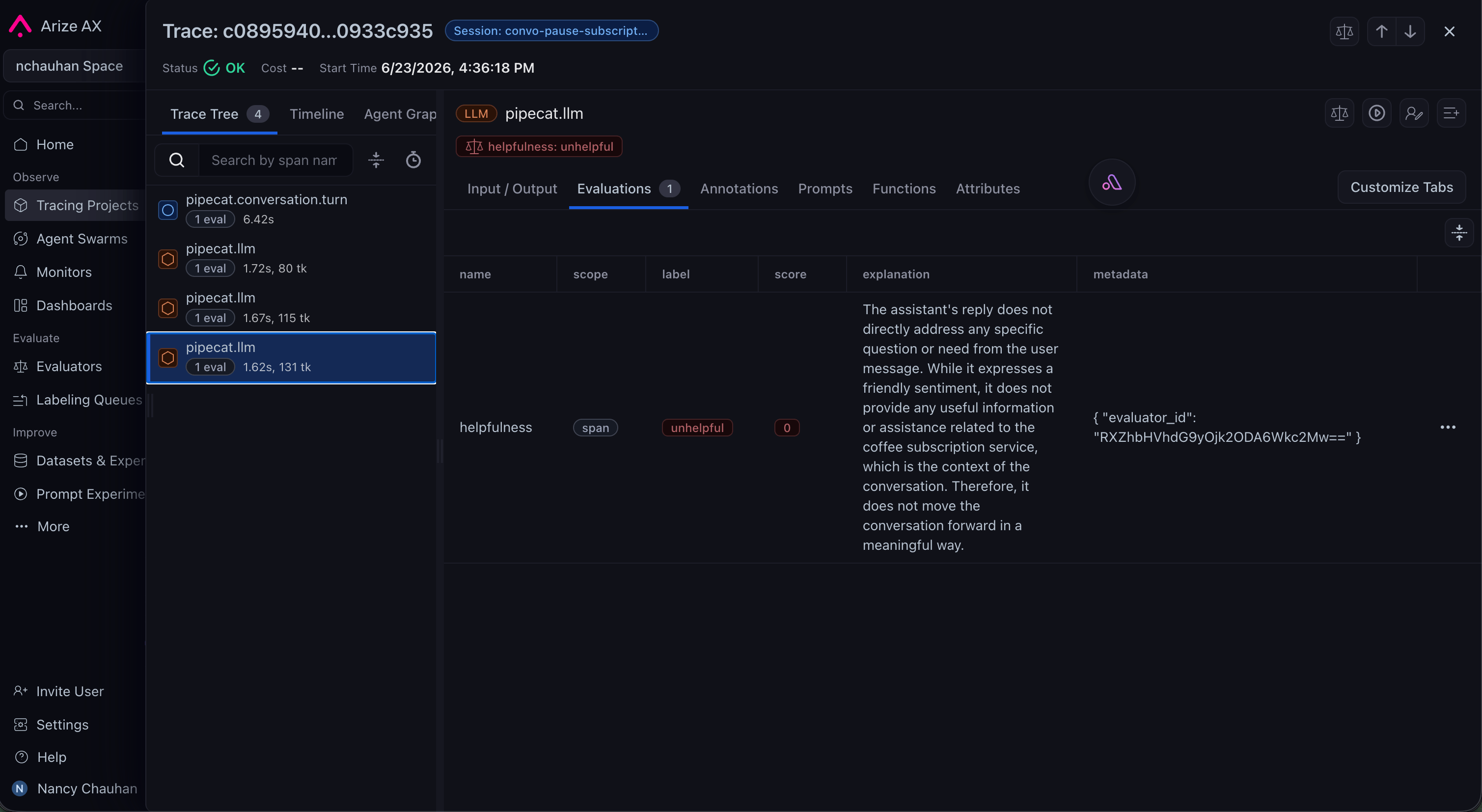 This complements Pipecat Evals: use Pipecat Evals for fast, scripted, pre-merge behavioral checks, and Arize for production-scale observability and online scoring of real conversations.
## Next steps
Arize's official guide to tracing a Pipecat agent, including setup and what
gets captured.
Set up the hosted platform: projects, tracing, online evals, dashboards, and
monitors.
Self-host the open-source version for local tracing and evaluation of your
Pipecat agent.
The OpenTelemetry-compatible semantic conventions behind Arize's
instrumentation.
This complements Pipecat Evals: use Pipecat Evals for fast, scripted, pre-merge behavioral checks, and Arize for production-scale observability and online scoring of real conversations.
## Next steps
Arize's official guide to tracing a Pipecat agent, including setup and what
gets captured.
Set up the hosted platform: projects, tracing, online evals, dashboards, and
monitors.
Self-host the open-source version for local tracing and evaluation of your
Pipecat agent.
The OpenTelemetry-compatible semantic conventions behind Arize's
instrumentation.