> ## Documentation Index
> Fetch the complete documentation index at: https://docs.pipecat.ai/llms.txt
> Use this file to discover all available pages before exploring further.
# Building with Gemini Live
> Create real-time voice AI agents using Google's Gemini Live API and Pipecat
Gemini Live is Google's speech-to-speech API that enables natural, real-time voice conversations with AI. With Pipecat, you can build production-ready voice agents that leverage Gemini Live for telephony, web, and mobile applications.
Gemini Live service documentation
Scaffold and deploy projects
## Capabilities
Pipecat's Gemini Live integration supports multiple modalities and deployment targets:
Real-time speech-to-speech conversations with natural turn-taking and voice
activity detection
Process video and screenshare alongside audio for multimodal interactions
Build phone-based voice agents with Twilio WebSocket integration
Function calling support for external integrations and dynamic responses
### Architecture
Pipecat manages connections between your client and Gemini Live:
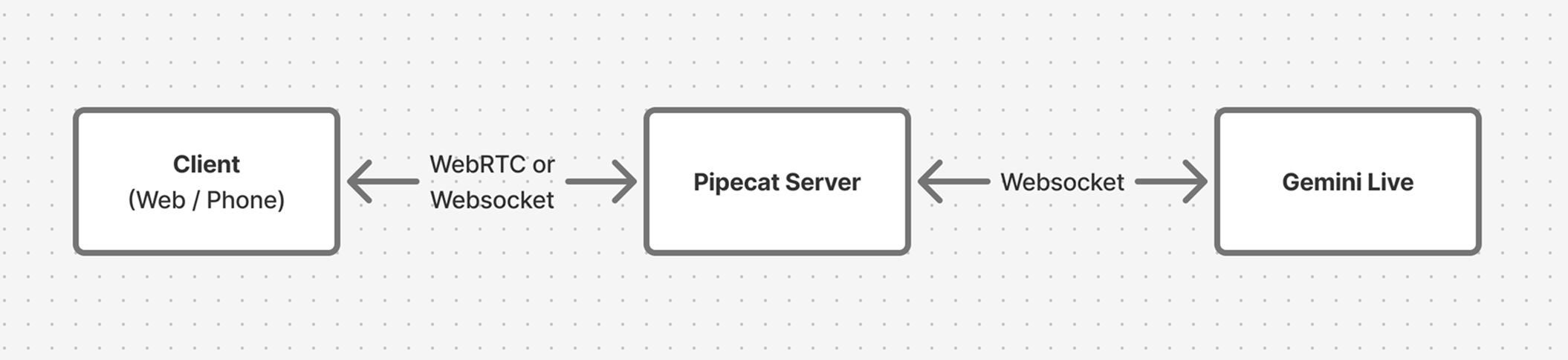 The Pipecat server handles media streaming with clients via WebRTC (web/mobile) or WebSockets (telephony), while maintaining a persistent connection to Gemini Live for real-time AI processing.
## Quick Start
The fastest way to start building is with the Pipecat CLI:
```bash theme={null}
# Install the CLI
uv tool install "pipecat-ai[cli]"
# Create a new project
pipecat create
```
The CLI will guide you through selecting:
* **Bot type**: Gemini Live (speech-to-speech)
* **Transport**: Daily WebRTC, Twilio, or others
* **Deployment target**: Local development or Pipecat Cloud
All CLI commands can use either `pipecat` or the shorter `pc` alias.
## Starter Projects
These complete examples demonstrate Gemini Live in production scenarios. Each includes local development setup and Pipecat Cloud deployment configuration.
### Phone Bot (Twilio)
A telephone-based voice agent using Gemini Live with Twilio WebSockets. The demo plays "Two Truths and a Lie" to showcase natural conversation flow.
Build a production phone agent with Twilio integration
**Try it now**: Call **1-970-LIVE-API** (1-970-548-3274) to talk to a live demo.
**What you'll learn**:
* Twilio WebSocket transport configuration
* Google STT/TTS integration alongside Gemini Live
* TwiML setup for incoming calls
* Pipecat Cloud deployment with telephony
### Web Bot (Vision)
A browser-based agent with screensharing and vision capabilities, built with the Pipecat Voice UI Kit and Daily WebRTC transport.
Build a web agent with vision and screensharing
**What you'll learn**:
* Daily WebRTC transport for web clients
* Vision/screenshare processing with Gemini Live
* Next.js client with Voice UI Kit components
* Resizable panels and event logging
## Deployment
Both starter projects include configuration for [Pipecat Cloud](/pipecat-cloud/introduction), which handles scaling, monitoring, and global deployment.
```bash theme={null}
# Authenticate with Pipecat Cloud
pipecat cloud auth login
# Deploy your agent
pipecat cloud deploy
```
Each starter includes a `pcc-deploy.toml` file with sensible defaults for agent configuration and scaling.
Learn more about deploying to production
## Next Steps
Add external integrations and dynamic responses
Build custom web interfaces
Deep dive into phone integrations
Understand Pipecat pipelines and processors
The Pipecat server handles media streaming with clients via WebRTC (web/mobile) or WebSockets (telephony), while maintaining a persistent connection to Gemini Live for real-time AI processing.
## Quick Start
The fastest way to start building is with the Pipecat CLI:
```bash theme={null}
# Install the CLI
uv tool install "pipecat-ai[cli]"
# Create a new project
pipecat create
```
The CLI will guide you through selecting:
* **Bot type**: Gemini Live (speech-to-speech)
* **Transport**: Daily WebRTC, Twilio, or others
* **Deployment target**: Local development or Pipecat Cloud
All CLI commands can use either `pipecat` or the shorter `pc` alias.
## Starter Projects
These complete examples demonstrate Gemini Live in production scenarios. Each includes local development setup and Pipecat Cloud deployment configuration.
### Phone Bot (Twilio)
A telephone-based voice agent using Gemini Live with Twilio WebSockets. The demo plays "Two Truths and a Lie" to showcase natural conversation flow.
Build a production phone agent with Twilio integration
**Try it now**: Call **1-970-LIVE-API** (1-970-548-3274) to talk to a live demo.
**What you'll learn**:
* Twilio WebSocket transport configuration
* Google STT/TTS integration alongside Gemini Live
* TwiML setup for incoming calls
* Pipecat Cloud deployment with telephony
### Web Bot (Vision)
A browser-based agent with screensharing and vision capabilities, built with the Pipecat Voice UI Kit and Daily WebRTC transport.
Build a web agent with vision and screensharing
**What you'll learn**:
* Daily WebRTC transport for web clients
* Vision/screenshare processing with Gemini Live
* Next.js client with Voice UI Kit components
* Resizable panels and event logging
## Deployment
Both starter projects include configuration for [Pipecat Cloud](/pipecat-cloud/introduction), which handles scaling, monitoring, and global deployment.
```bash theme={null}
# Authenticate with Pipecat Cloud
pipecat cloud auth login
# Deploy your agent
pipecat cloud deploy
```
Each starter includes a `pcc-deploy.toml` file with sensible defaults for agent configuration and scaling.
Learn more about deploying to production
## Next Steps
Add external integrations and dynamic responses
Build custom web interfaces
Deep dive into phone integrations
Understand Pipecat pipelines and processors