> ## Documentation Index
> Fetch the complete documentation index at: https://docs.pipecat.ai/llms.txt
> Use this file to discover all available pages before exploring further.
# Proxy Agents
> Connect agents on different buses with proxy agents.
## Overview
Proxy agents connect agents running on **different buses**. Unlike [distributed agents](/pipecat/learn/distributed-agents) (which all share the same bus), proxy agents bridge two isolated bus instances point-to-point. This is useful when:
* You want to run an LLM agent on a separate server without shared infrastructure
* You need fine-grained control over which messages cross the network
* You're connecting to a third-party service that hosts agents
## Architecture
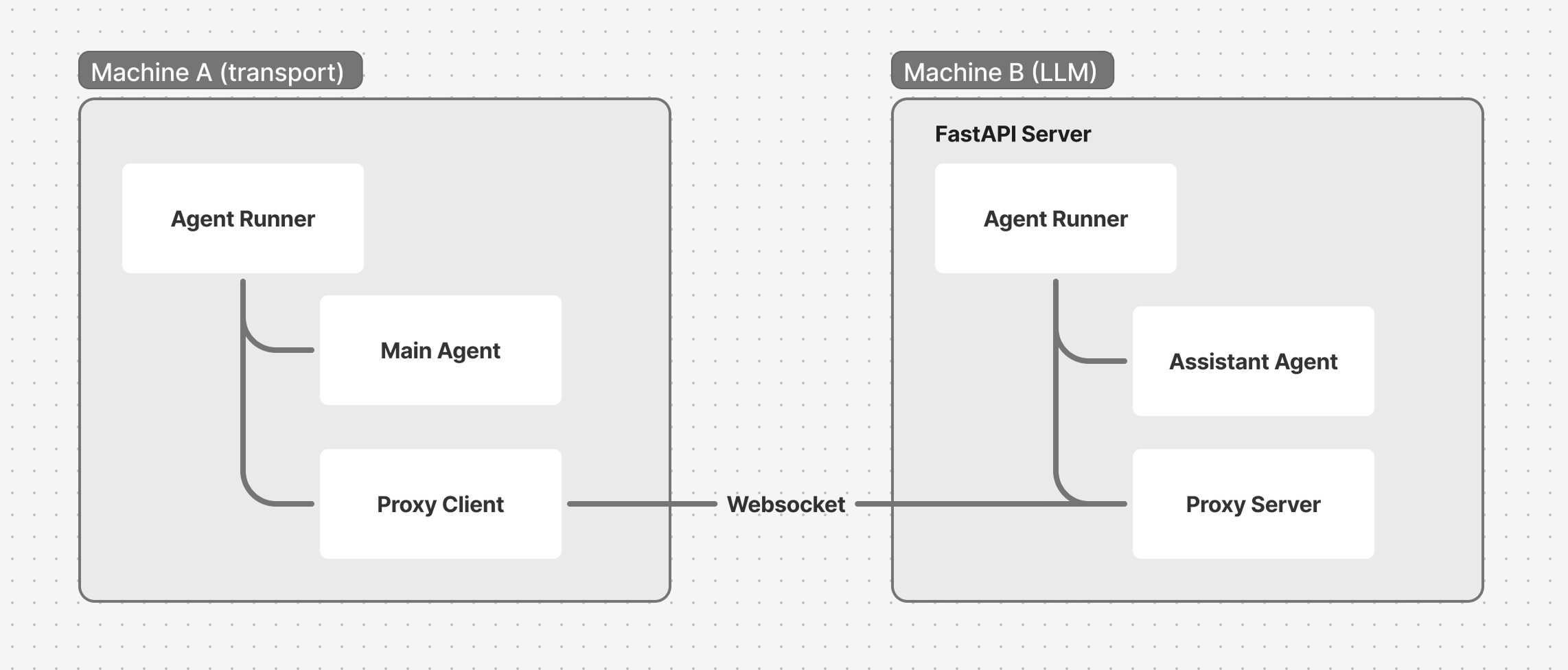 Each side has its own `WorkerRunner` and bus. The proxy agents relay messages between the two buses over a WebSocket connection. Like any worker, a proxy gets its bus from the runner when you register it -- you never pass `bus=` to its constructor.
## Client side: WebSocketProxyClient
The client connects to a remote server and forwards specific message types:
```python theme={null}
from pipecat.bus import BusFrameMessage
from pipecat.workers.proxy.websocket import WebSocketProxyClient
proxy = WebSocketProxyClient(
"proxy",
url="ws://remote-server:8765/ws",
local_worker_name="acme", # Agent on this bus
remote_worker_name="assistant", # Agent on remote bus
forward_messages=(BusFrameMessage,),
)
await runner.add_workers(proxy)
```
| Parameter | Description |
| -------------------- | ------------------------------------------------------------- |
| `url` | WebSocket URL of the remote server |
| `local_worker_name` | Name of the local agent that exchanges frames with the remote |
| `remote_worker_name` | Name of the remote agent to communicate with |
| `forward_messages` | Tuple of message types to forward across the connection |
| `headers` | Optional HTTP headers (e.g. authentication tokens) |
The proxy connects when activated. Activate it when the client connects, by calling `activate_worker` on the main agent:
```python theme={null}
@transport.event_handler("on_client_connected")
async def on_client_connected(transport, client):
await main.activate_worker("proxy")
```
## Server side: WebSocketProxyServer
The server accepts WebSocket connections and creates a proxy for each session:
```python theme={null}
from fastapi import FastAPI, WebSocket
from pipecat.bus import BusFrameMessage
from pipecat.workers.runner import WorkerRunner
from pipecat.workers.proxy.websocket import WebSocketProxyServer
app = FastAPI()
@app.websocket("/ws")
async def websocket_endpoint(websocket: WebSocket):
await websocket.accept()
runner = WorkerRunner(handle_sigint=False)
proxy = WebSocketProxyServer(
"gateway",
websocket=websocket,
worker_name="assistant", # Agent on this bus
remote_worker_name="acme", # Agent on remote bus
forward_messages=(BusFrameMessage,),
)
assistant = build_assistant() # an LLMWorker named "assistant"
await runner.add_workers(proxy, assistant)
await runner.run()
```
Each WebSocket connection gets its own `WorkerRunner`, bus, and set of agents. This isolates sessions from each other.
## Message filtering
Proxy agents provide security through message filtering:
* Only messages targeted at the configured agent names cross the connection
* Broadcast messages (no target) are **not** forwarded
* Local-only messages (`BusLocalMessage`) never cross
* `forward_messages` controls which message types are allowed
This means internal bus traffic stays local. Only the specific message types you opt into are relayed.
## Full example
### Client (main.py)
```python theme={null}
async def run_bot(transport, runner_args):
runner = WorkerRunner(handle_sigint=runner_args.handle_sigint)
# ... build the main transport pipeline with a BusBridgeProcessor ...
main = PipelineWorker(pipeline, name="acme", params=PipelineParams(...))
proxy = WebSocketProxyClient(
"proxy",
url=runner_args.cli_args.remote_url,
local_worker_name="acme",
remote_worker_name="assistant",
forward_messages=(BusFrameMessage,),
)
async def on_assistant_ready(_data):
await main.activate_worker(
"assistant",
args=LLMWorkerActivationArgs(
messages=[{"role": "developer", "content": "Welcome the user."}],
),
)
await runner.registry.watch("assistant", on_assistant_ready)
@transport.event_handler("on_client_connected")
async def on_client_connected(transport, client):
await main.activate_worker("proxy")
@transport.event_handler("on_client_disconnected")
async def on_client_disconnected(transport, client):
await runner.cancel()
await runner.add_workers(proxy, main)
await runner.run()
```
### Server (assistant.py)
```python theme={null}
@app.websocket("/ws")
async def websocket_endpoint(websocket: WebSocket):
await websocket.accept()
runner = WorkerRunner(handle_sigint=False)
proxy = WebSocketProxyServer(
"gateway",
websocket=websocket,
worker_name="assistant",
remote_worker_name="acme",
forward_messages=(BusFrameMessage,),
)
@proxy.event_handler("on_client_connected")
async def on_client_connected(proxy, client):
logger.info("WebSocket client connected")
@proxy.event_handler("on_client_disconnected")
async def on_client_disconnected(proxy, client):
await runner.cancel()
assistant = AcmeAssistant() # an LLMWorker named "assistant"
await runner.add_workers(proxy, assistant)
await runner.run()
```
### Running
```bash theme={null}
# Terminal 1: Start the LLM server
python assistant.py --port 8765
# Terminal 2: Start the transport client
python main.py --remote-url ws://localhost:8765/ws
```
Install the WebSocket extra: `uv add "pipecat-ai[websocket]"`
## Proxy agents vs distributed agents
| | Proxy Agents (different buses) | Distributed (same bus) |
| --------------------- | ------------------------------------- | ------------------------------ |
| **Topology** | Point-to-point | Many-to-many |
| **Session isolation** | Each connection is isolated | All agents share a channel |
| **Use case** | Separate networks, third-party agents | Scaling agents across machines |
## What's next
You've built a multi-agent system and scaled it across processes, machines, and networks. Here's where to go from here.
Explore Fundamentals and advanced patterns
Each side has its own `WorkerRunner` and bus. The proxy agents relay messages between the two buses over a WebSocket connection. Like any worker, a proxy gets its bus from the runner when you register it -- you never pass `bus=` to its constructor.
## Client side: WebSocketProxyClient
The client connects to a remote server and forwards specific message types:
```python theme={null}
from pipecat.bus import BusFrameMessage
from pipecat.workers.proxy.websocket import WebSocketProxyClient
proxy = WebSocketProxyClient(
"proxy",
url="ws://remote-server:8765/ws",
local_worker_name="acme", # Agent on this bus
remote_worker_name="assistant", # Agent on remote bus
forward_messages=(BusFrameMessage,),
)
await runner.add_workers(proxy)
```
| Parameter | Description |
| -------------------- | ------------------------------------------------------------- |
| `url` | WebSocket URL of the remote server |
| `local_worker_name` | Name of the local agent that exchanges frames with the remote |
| `remote_worker_name` | Name of the remote agent to communicate with |
| `forward_messages` | Tuple of message types to forward across the connection |
| `headers` | Optional HTTP headers (e.g. authentication tokens) |
The proxy connects when activated. Activate it when the client connects, by calling `activate_worker` on the main agent:
```python theme={null}
@transport.event_handler("on_client_connected")
async def on_client_connected(transport, client):
await main.activate_worker("proxy")
```
## Server side: WebSocketProxyServer
The server accepts WebSocket connections and creates a proxy for each session:
```python theme={null}
from fastapi import FastAPI, WebSocket
from pipecat.bus import BusFrameMessage
from pipecat.workers.runner import WorkerRunner
from pipecat.workers.proxy.websocket import WebSocketProxyServer
app = FastAPI()
@app.websocket("/ws")
async def websocket_endpoint(websocket: WebSocket):
await websocket.accept()
runner = WorkerRunner(handle_sigint=False)
proxy = WebSocketProxyServer(
"gateway",
websocket=websocket,
worker_name="assistant", # Agent on this bus
remote_worker_name="acme", # Agent on remote bus
forward_messages=(BusFrameMessage,),
)
assistant = build_assistant() # an LLMWorker named "assistant"
await runner.add_workers(proxy, assistant)
await runner.run()
```
Each WebSocket connection gets its own `WorkerRunner`, bus, and set of agents. This isolates sessions from each other.
## Message filtering
Proxy agents provide security through message filtering:
* Only messages targeted at the configured agent names cross the connection
* Broadcast messages (no target) are **not** forwarded
* Local-only messages (`BusLocalMessage`) never cross
* `forward_messages` controls which message types are allowed
This means internal bus traffic stays local. Only the specific message types you opt into are relayed.
## Full example
### Client (main.py)
```python theme={null}
async def run_bot(transport, runner_args):
runner = WorkerRunner(handle_sigint=runner_args.handle_sigint)
# ... build the main transport pipeline with a BusBridgeProcessor ...
main = PipelineWorker(pipeline, name="acme", params=PipelineParams(...))
proxy = WebSocketProxyClient(
"proxy",
url=runner_args.cli_args.remote_url,
local_worker_name="acme",
remote_worker_name="assistant",
forward_messages=(BusFrameMessage,),
)
async def on_assistant_ready(_data):
await main.activate_worker(
"assistant",
args=LLMWorkerActivationArgs(
messages=[{"role": "developer", "content": "Welcome the user."}],
),
)
await runner.registry.watch("assistant", on_assistant_ready)
@transport.event_handler("on_client_connected")
async def on_client_connected(transport, client):
await main.activate_worker("proxy")
@transport.event_handler("on_client_disconnected")
async def on_client_disconnected(transport, client):
await runner.cancel()
await runner.add_workers(proxy, main)
await runner.run()
```
### Server (assistant.py)
```python theme={null}
@app.websocket("/ws")
async def websocket_endpoint(websocket: WebSocket):
await websocket.accept()
runner = WorkerRunner(handle_sigint=False)
proxy = WebSocketProxyServer(
"gateway",
websocket=websocket,
worker_name="assistant",
remote_worker_name="acme",
forward_messages=(BusFrameMessage,),
)
@proxy.event_handler("on_client_connected")
async def on_client_connected(proxy, client):
logger.info("WebSocket client connected")
@proxy.event_handler("on_client_disconnected")
async def on_client_disconnected(proxy, client):
await runner.cancel()
assistant = AcmeAssistant() # an LLMWorker named "assistant"
await runner.add_workers(proxy, assistant)
await runner.run()
```
### Running
```bash theme={null}
# Terminal 1: Start the LLM server
python assistant.py --port 8765
# Terminal 2: Start the transport client
python main.py --remote-url ws://localhost:8765/ws
```
Install the WebSocket extra: `uv add "pipecat-ai[websocket]"`
## Proxy agents vs distributed agents
| | Proxy Agents (different buses) | Distributed (same bus) |
| --------------------- | ------------------------------------- | ------------------------------ |
| **Topology** | Point-to-point | Many-to-many |
| **Session isolation** | Each connection is isolated | All agents share a channel |
| **Use case** | Separate networks, third-party agents | Scaling agents across machines |
## What's next
You've built a multi-agent system and scaled it across processes, machines, and networks. Here's where to go from here.
Explore Fundamentals and advanced patterns