Documentation Index
Fetch the complete documentation index at: https://docs.pipecat.ai/llms.txt
Use this file to discover all available pages before exploring further.
Overview
Proxy agents connect agents running on different buses. Unlike distributed agents (which all share the same bus), proxy agents bridge two isolated bus instances point-to-point. This is useful when:
- You want to run an LLM agent on a separate server without shared infrastructure
- You need fine-grained control over which messages cross the network
- You’re connecting to a third-party service that hosts agents
Architecture
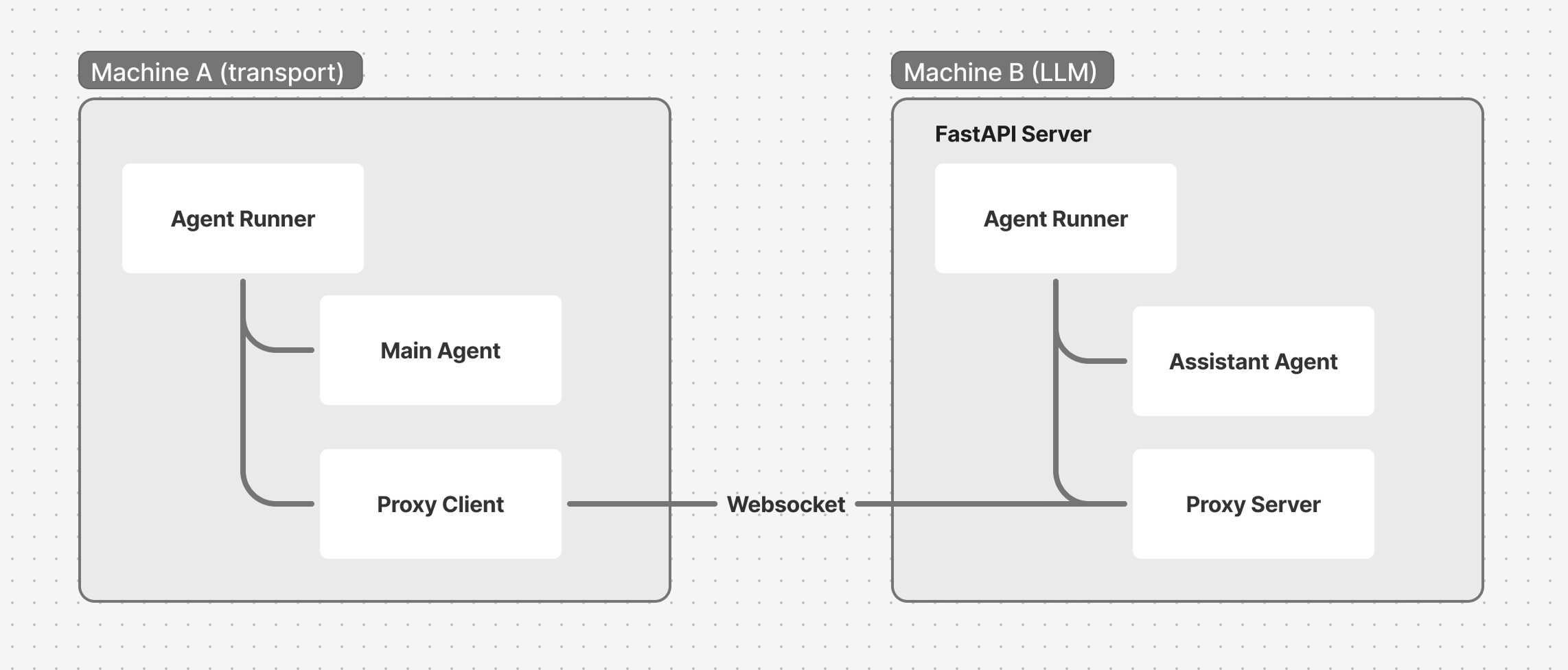
Each side has its own WorkerRunner and bus. The proxy agents relay messages between the two buses over a WebSocket connection. Like any worker, a proxy gets its bus from the runner when you register it — you never pass bus= to its constructor.
Client side: WebSocketProxyClient
The client connects to a remote server and forwards specific message types:
from pipecat.bus import BusFrameMessage
from pipecat.workers.proxy.websocket import WebSocketProxyClient

proxy = WebSocketProxyClient(
    "proxy",
    url="ws://remote-server:8765/ws",
    local_worker_name="acme",         # Agent on this bus
    remote_worker_name="assistant",   # Agent on remote bus
    forward_messages=(BusFrameMessage,),
)
await runner.add_workers(proxy)
| Parameter | Description |
|---|
url | WebSocket URL of the remote server |
local_worker_name | Name of the local agent that exchanges frames with the remote |
remote_worker_name | Name of the remote agent to communicate with |
forward_messages | Tuple of message types to forward across the connection |
headers | Optional HTTP headers (e.g. authentication tokens) |
activate_worker on the main agent:
@transport.event_handler("on_client_connected")
async def on_client_connected(transport, client):
    await main.activate_worker("proxy")
Server side: WebSocketProxyServer
The server accepts WebSocket connections and creates a proxy for each session:
from fastapi import FastAPI, WebSocket

from pipecat.bus import BusFrameMessage
from pipecat.workers.runner import WorkerRunner
from pipecat.workers.proxy.websocket import WebSocketProxyServer

app = FastAPI()


@app.websocket("/ws")
async def websocket_endpoint(websocket: WebSocket):
    await websocket.accept()

    runner = WorkerRunner(handle_sigint=False)

    proxy = WebSocketProxyServer(
        "gateway",
        websocket=websocket,
        worker_name="assistant",        # Agent on this bus
        remote_worker_name="acme",      # Agent on remote bus
        forward_messages=(BusFrameMessage,),
    )

    assistant = build_assistant()  # an LLMWorker named "assistant"

    await runner.add_workers(proxy, assistant)
    await runner.run()
WorkerRunner, bus, and set of agents. This isolates sessions from each other.
Message filtering
Proxy agents provide security through message filtering:
- Only messages targeted at the configured agent names cross the connection
- Broadcast messages (no target) are not forwarded
- Local-only messages (
BusLocalMessage) never cross
forward_messages controls which message types are allowed
This means internal bus traffic stays local. Only the specific message types you opt into are relayed.
Full example
Client (main.py)
async def run_bot(transport, runner_args):
    runner = WorkerRunner(handle_sigint=runner_args.handle_sigint)

    # ... build the main transport pipeline with a BusBridgeProcessor ...
    main = PipelineWorker(pipeline, name="acme", params=PipelineParams(...))

    proxy = WebSocketProxyClient(
        "proxy",
        url=runner_args.cli_args.remote_url,
        local_worker_name="acme",
        remote_worker_name="assistant",
        forward_messages=(BusFrameMessage,),
    )

    async def on_assistant_ready(_data):
        await main.activate_worker(
            "assistant",
            args=LLMWorkerActivationArgs(
                messages=[{"role": "developer", "content": "Welcome the user."}],
            ),
        )

    await runner.registry.watch("assistant", on_assistant_ready)

    @transport.event_handler("on_client_connected")
    async def on_client_connected(transport, client):
        await main.activate_worker("proxy")

    @transport.event_handler("on_client_disconnected")
    async def on_client_disconnected(transport, client):
        await runner.cancel()

    await runner.add_workers(proxy, main)
    await runner.run()
Server (assistant.py)
@app.websocket("/ws")
async def websocket_endpoint(websocket: WebSocket):
    await websocket.accept()
    runner = WorkerRunner(handle_sigint=False)

    proxy = WebSocketProxyServer(
        "gateway",
        websocket=websocket,
        worker_name="assistant",
        remote_worker_name="acme",
        forward_messages=(BusFrameMessage,),
    )

    @proxy.event_handler("on_client_connected")
    async def on_client_connected(proxy, client):
        logger.info("WebSocket client connected")

    @proxy.event_handler("on_client_disconnected")
    async def on_client_disconnected(proxy, client):
        await runner.cancel()

    assistant = AcmeAssistant()  # an LLMWorker named "assistant"
    await runner.add_workers(proxy, assistant)
    await runner.run()
Running
# Terminal 1: Start the LLM server
python assistant.py --port 8765

# Terminal 2: Start the transport client
python main.py --remote-url ws://localhost:8765/ws
Install the WebSocket extra: uv add "pipecat-ai[websocket]"
Proxy agents vs distributed agents
| Proxy Agents (different buses) | Distributed (same bus) |
|---|
| Topology | Point-to-point | Many-to-many |
| Session isolation | Each connection is isolated | All agents share a channel |
| Use case | Separate networks, third-party agents | Scaling agents across machines |