The Session API lets you send HTTP requests directly to your running Pipecat Cloud agents. This enables real-time control and data exchange with active sessions, such as updating conversation context, triggering actions, or retrieving session state.
How It Works
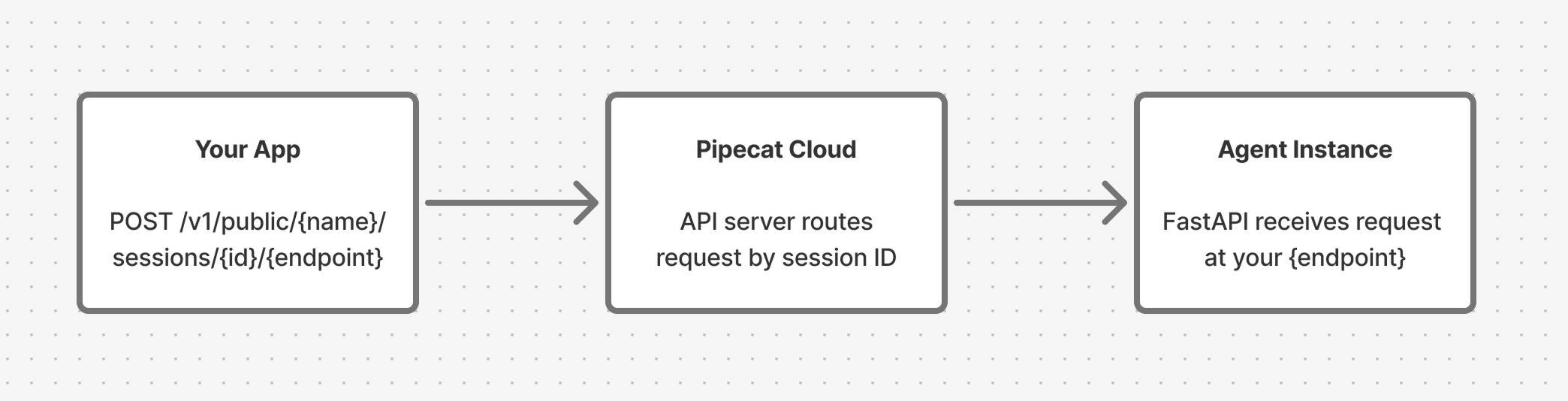
Your bot runs inside a FastAPI server managed by the Pipecat Cloud base image. When you define custom endpoints using the app object from pipecatcloud_system, they become reachable through the Session API.
Requests are proxied through Pipecat Cloud to the specific bot instance handling your session:
To use the Session API:
Start a session
Start a session with your
agent and capture the sessionId from the response. Define endpoints in your bot
Add custom routes to the app object from pipecatcloud_system in your
bot.py.
Send requests to your session
Make HTTP requests to the session endpoint. Pipecat Cloud routes them to the
bot instance for that session.
https://api.pipecat.daily.co/v1/public/{service_name}/sessions/{session_id}/{path}
| Parameter | Description |
|---|
service_name | The name of your deployed agent |
session_id | The sessionId value from the start response |
path | The endpoint path you defined in your bot |
Supported Methods
GET, POST, PUT, PATCH, DELETE, OPTIONS, HEAD
Authentication
Include your Pipecat Cloud public API key in the Authorization header:
Authorization: Bearer pk_...
Setting Up Your Bot
Define endpoints in your bot.py using the app object from pipecatcloud_system. This is the same FastAPI application that serves your bot, so your custom routes run alongside the built-in ones.
from pipecatcloud_system import app

@app.get("/status")
async def get_status():
    return {"status": "active"}

@app.post("/context")
async def update_context(data: dict):
    return {"updated": True}
Requires base image version 0.1.2 or later.
Connecting Endpoints to Your Pipeline
Most Session API use cases require your endpoint to interact with the running pipeline. The pattern is:
- Store a reference to your
PipelineTask in a module-level variable
- Access it from your endpoint handler to queue frames into the pipeline
from pipecatcloud_system import app
from pipecat.pipeline.task import PipelineTask

# Module-level reference to the running pipeline task
pipeline_task: PipelineTask | None = None

async def bot(args):
    global pipeline_task

    # ... set up your pipeline ...

    pipeline_task = task

    runner = PipelineRunner()
    await runner.run(task)

    pipeline_task = None

@app.post("/context")
async def update_context(data: dict):
    if not pipeline_task:
        return {"error": "No active pipeline"}, 503
    # Use pipeline_task.queue_frame() to inject frames
    # ...
Since Pipecat Cloud runs one session per pod, a single module-level variable
works well. You don’t need to key by session ID.
Examples
Update Conversation Context
Use LLMMessagesAppendFrame to add messages to the LLM’s conversation context from an HTTP request. Setting run_llm=True tells the pipeline to immediately send the updated context to the LLM for a response.
from pipecatcloud_system import app
from pydantic import BaseModel
from pipecat.pipeline.task import PipelineTask
from pipecat.pipeline.runner import PipelineRunner
from pipecat.frames.frames import LLMMessagesAppendFrame

pipeline_task: PipelineTask | None = None

class ContextUpdate(BaseModel):
    user_name: str
    preferences: dict

@app.post("/context")
async def update_context(update: ContextUpdate):
    if not pipeline_task:
        return {"error": "No active pipeline"}, 503

    # Inject a developer message into the conversation
    await pipeline_task.queue_frame(
        LLMMessagesAppendFrame(
            messages=[{
                "role": "developer",
                "content": (
                    f"The user's name is {update.user_name}. "
                    f"Their preferences: {update.preferences}"
                ),
            }],
            run_llm=False,  # Don't trigger a response yet
        )
    )

    return {"status": "context updated", "user_name": update.user_name}

async def bot(args):
    global pipeline_task

    # ... set up your pipeline ...

    pipeline_task = task

    runner = PipelineRunner()
    await runner.run(task)

    pipeline_task = None
curl -X POST \
  'https://api.pipecat.daily.co/v1/public/my-agent/sessions/{session_id}/context' \
  -H 'Authorization: Bearer pk_...' \
  -H 'Content-Type: application/json' \
  -d '{"user_name": "Alice", "preferences": {"language": "Spanish"}}'
Trigger the Bot to Speak
Use TTSSpeakFrame to make the bot say something on demand:
from pipecatcloud_system import app
from pydantic import BaseModel
from pipecat.pipeline.task import PipelineTask
from pipecat.pipeline.runner import PipelineRunner
from pipecat.frames.frames import TTSSpeakFrame

pipeline_task: PipelineTask | None = None

class SpeakRequest(BaseModel):
    message: str

@app.post("/speak")
async def trigger_speech(req: SpeakRequest):
    if not pipeline_task:
        return {"error": "No active pipeline"}, 503

    await pipeline_task.queue_frame(TTSSpeakFrame(text=req.message))

    return {"queued": True, "message": req.message}

async def bot(args):
    global pipeline_task

    # ... set up your pipeline ...

    pipeline_task = task

    runner = PipelineRunner()
    await runner.run(task)

    pipeline_task = None
curl -X POST \
  'https://api.pipecat.daily.co/v1/public/my-agent/sessions/{session_id}/speak' \
  -H 'Authorization: Bearer pk_...' \
  -H 'Content-Type: application/json' \
  -d '{"message": "Hello Alice, welcome back!"}'
Get Session Status
Endpoints don’t have to interact with the pipeline. You can also use them to expose any state your bot tracks:
from pipecatcloud_system import app

session_data = {"messages": [], "user_name": None}

@app.get("/status")
async def get_status():
    return {
        "message_count": len(session_data["messages"]),
        "user_name": session_data["user_name"],
    }
curl -X GET \
  'https://api.pipecat.daily.co/v1/public/my-agent/sessions/{session_id}/status' \
  -H 'Authorization: Bearer pk_...'
Important Notes
- Startup latency: If you call the Session API before your bot finishes initializing, the request may take longer while waiting for the bot to become available.
- Session scope: Each request is routed to the specific bot instance identified by
session_id. Different sessions are separate pods and don’t share state.
- Error handling: If a session has ended or the session ID is invalid, you’ll receive an error response.
- Reserved paths: The base image uses
/bot, /ws, /api/offer, /whatsapp, /readyz, and /livez. Don’t define endpoints at these paths.
Getting Help
If you have questions about the Session API, reach out on Discord.